
A cost and security comparison of local NAS devices (Synology, QNAP, Ugreen), RAID setups, S3/Backblaze cold backup and the 3-2-1 data protection architecture.
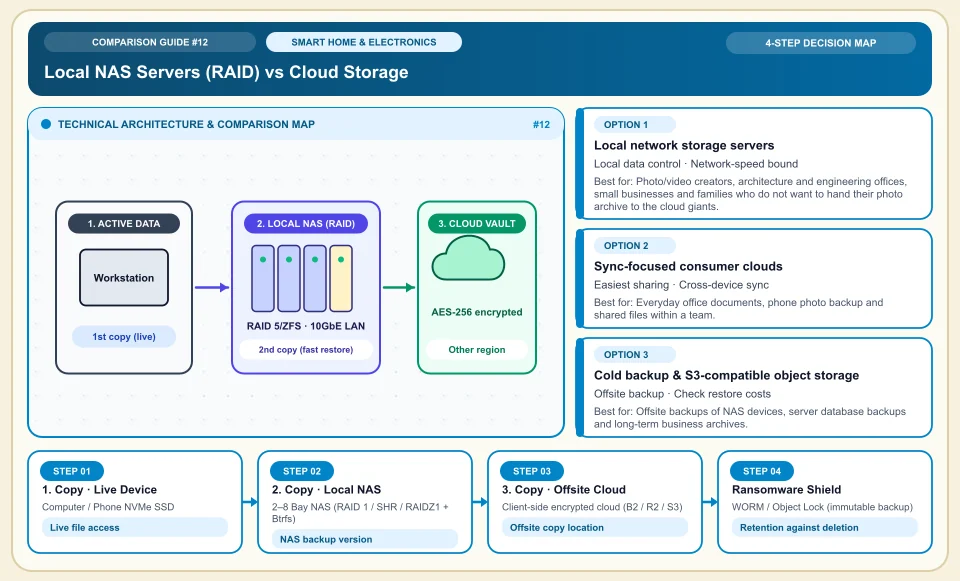
RAID gives continuity; recovering a deleted or corrupted file needs a separate backup.
The three-copies, two-media, one-offsite principle reduces the risk of a single device failure or a local incident. A NAS, cloud storage and an immutable backup each play a different role. Which is cheaper depends on capacity, egress, operations, hardware and upkeep costs.
Separate backup from sync; try restoring an old version of a deleted file.
Keep the offsite copy and its access rights independent of the main device.
Calculate cloud versus NAS cost with your own data growth and retention scenario.
Local NAS Servers (RAID) vs Cloud Storage
3-2-1 data protection: working device → fast local NAS (RAID + snapshots) → encrypted offsite cloud vault:
Computer / Phone NVMe SSD
Active project files and the phone gallery you work on daily; the layer most exposed to theft and corruption.
2–8 Bay NAS (RAID 1 / SHR / RAIDZ1 + Btrfs)
A NAS offers local access; speed depends on the network link, disk layout and client. A snapshot is not an independent backup.
Client-side encrypted cloud (B2 / R2 / S3)
An offsite copy can help in a disaster; a full recovery needs the encryption key and a tested restore.
WORM / Object Lock (immutable backup)
Object Lock can limit changes for a set period; verify account permissions and configuration.
An Honest Comparison of the Different Types, Pros and Cons
See the bottlenecks that marketing brochures hide, how each type works, and who each architecture suits, side by side:
1. Local network storage servers (NAS — Synology, QNAP, Ugreen NASync, TrueNAS)
A mini server with its own operating system that runs 24/7 at home or in the office and holds 2 to 8 enterprise 3.5" hard drives (IronWolf / WD Red) or NVMe drives.
✅ Strengths (pros)
- Local storage works for photo archives and large capacity; disk, energy and upkeep costs are calculated separately.
- Speed is limited by the local network and disks; test large-file or video workflows on your own setup.
⚠️ Weaknesses & limits (cons)
- The upfront cost (device + at least 2 NAS disks + a UPS) is high.
- A UPS and regular backups can help against unexpected shutdowns; check the NAS vendor's compatibility.
Photo/video creators, architecture and engineering offices, small businesses and families who do not want to hand their photo archive to the cloud giants.
2. Sync-focused consumer clouds (Google Drive, iCloud, OneDrive, Dropbox)
Mirrors files two ways between a folder on your computer and the cloud (sync); a photo taken on your phone is backed up instantly.
✅ Strengths (pros)
- You can start without buying local hardware; factor in subscription and egress costs.
- If a phone is stolen or a computer breaks, your documents return as soon as you sign in on a new device.
⚠️ Weaknesses & limits (cons)
- Sync is not a real backup: a file you delete on your computer or that malware corrupts is damaged in the cloud at the same moment.
- Monthly subscriptions can grow at large capacities; total cost depends on usage and provider.
Everyday office documents, phone photo backup and shared files within a team.
3. Cold backup & S3-compatible object storage (Backblaze, Hetzner Storage Box, Cloudflare R2)
Designed less for file sharing and more for storing encrypted backup packages (Duplicati, Restic, Hyper Backup, Borg) cheaply and safely.
✅ Strengths (pros)
- Monthly storage cost per terabyte can be a fraction of consumer clouds (Drive/Dropbox).
- Version history and object lock can offer restore options; regular testing is needed to ensure a clean copy.
⚠️ Weaknesses & limits (cons)
- There is no office interface to edit Word/Excel files; you connect through backup software or a NAS.
- On very cold archive tiers such as S3 Glacier, restoring data can take hours and may incur download fees.
Offsite backups of NAS devices, server database backups and long-term business archives.
Side-by-Side Technical Criteria and Performance Table
The core engineering, cost and usage parameters you can compare directly when deciding:
| Criterion | Local NAS (RAID + Btrfs) | Consumer Cloud (Drive / iCloud) | Backup Cloud (Backblaze / Storage Box) | Engineering verdict |
|---|---|---|---|---|
| Total cost at a sample data volume | Hardware, energy and upkeep costs | Very high (rent grows monthly) | Economical (low per-TB fee) | Calculate NAS and cloud cost with the same data volume. |
| Large-File Transfer Speed | Depends on network and disk performance | Limited by internet upload speed | Limited by internet upload speed | For video editing and RAW photo archives, local NAS speed is essential. |
| Fire / Theft Protection | None (device in the same building) | Full (remote data center) | Full (remote data center) | A NAS alone is not enough; push an encrypted backup to the cloud overnight. |
| Data Privacy | Depends on local management and access settings | Subject to provider policies | Depends on client-side encryption and key management | Encrypt data on your device before it leaves for the cloud (zero-knowledge encryption). |
| Ransomware Shield | High with Btrfs snapshots | Medium (synced corruption risk) | Depends on Object Lock setup and retention plan | A locked (immutable) backup an attacker cannot delete can save you. |
Providers and reference points
Providers, platforms or official information sources you can weigh against your own needs. The list is not a market-share ranking or a physical product test.
Synology (DSM operating system)
- Offers the smoothest NAS software with SHR (combining different-sized disks without loss), Hyper Backup, Active Backup for Business (free backup of all PCs) and Synology Photos.
- Processor and network options vary by NAS model; compare same-priced devices on specs and software.
QNAP & Ugreen NASync (or DIY TrueNAS)
- Processor, network port and NVMe options vary by model; test Docker and virtual machine performance.
- The software interface is not as clean as Synology DSM; use it without opening ports directly to the internet (via a Tailscale/WireGuard VPN).
Backblaze (Computer Backup & B2 Cloud Storage)
- Computer backup and B2 object storage are separate products; calculate capacity, egress and price terms separately.
- Not a file-sharing or collaboration cloud; it is a pure disaster recovery and archive backup service.
Hetzner Storage Box & Proton Drive / Filen
- Storage Box offers backup protocols and Proton Drive offers encrypted storage; price and encryption scope vary by plan.
- Setting up Storage Box needs configuring a basic backup tool (Rclone / Hyper Backup WebDAV).
Category 2: Hardware, Smart Home & Consumer Electronics
Gaming and workstation hardware, 3-2-1 backup and NAS, Matter and Zigbee smart home protocols, 4G solar cameras, robot vacuums, PID espresso, online UPS, 3D printers, camera sensors and Wi-Fi 7 MLO.
Sources and review method
We checked the backup architecture principle against the provider's explanation; time and cost comparisons depend on data volume, network and retention terms. Translated and adapted for an international audience on 2026-11-03.
Sources checked:
- Backblaze 3-2-1 backup strategy ↗
Explains the three-copies, two-media, one-offsite principle; it does not provide a NAS-versus-cloud price comparison.
Frequently Asked Questions
Can I put regular desktop hard drives (HDD) in my 2-bay NAS?
When choosing NAS disks, check the vendor's compatibility list, the workload and the capacity. RAID is no substitute for a separate backup.
How should I connect to my NAS securely from outside the home?
Exposing a NAS directly to the internet can widen the attack surface. For remote access, consider a VPN, updates and multi-factor sign-in.
What is the difference between RAID 0 and RAID 1 (or SHR)?
RAID 0 gives no protection against disk failure. RAID 1 mirrors the data, but you still need a separate versioned backup against accidental deletion and ransomware.