
A game-by-game comparison of AMD 3D V-Cache processors, graphics card memory options, cooling and OLED/IPS monitors.
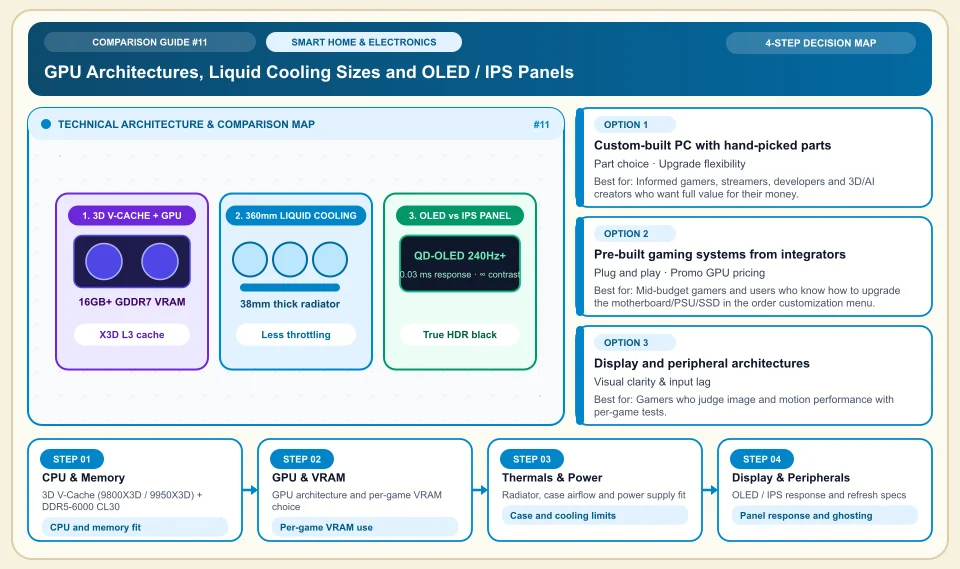
Balance a gaming PC around your target games, resolution, display and budget.
AMD lists 128 MB of L3 cache for the 9950X3D; on its own that does not guarantee a specific FPS or stutter-free play in every game. Choose the graphics card memory, CPU, power supply, cooling and monitor using measurements from the games you actually play. There is no universal minimum VRAM or budget percentage.
Check 1% low FPS and memory use in your target games at your target resolution.
Check CPU, graphics card and power supply compatibility at the system level.
Compare monitor refresh and response specs with real tests.
GPU Architectures, Liquid Cooling Sizes and OLED / IPS Panels
The chain from frame to eye: CPU and memory, GPU, cooling and monitor judged together:
3D V-Cache (9800X3D / 9950X3D) + DDR5-6000 CL30
Cache can help latency in some games; measure the result against the game engine, graphics card and memory.
GPU architecture and per-game VRAM choice
VRAM needs depend on the game, resolution and texture settings; test cards in the same scenario.
Radiator, case airflow and power supply fit
Cooling results depend on case airflow, CPU power limit and room temperature.
OLED / IPS response and refresh specs
OLED can offer a black-level advantage; judge motion trails and panel lifespan with model-specific tests.
An Honest Comparison of the Different Types, Pros and Cons
See the bottlenecks that marketing brochures hide, how each type works, and who each architecture suits, side by side:
1. Custom-built PC with hand-picked parts (Custom Workstation / Gaming Build)
Every part is picked individually so nothing bottlenecks the rest, from the motherboard bus (X870E/B850) and memory latency (CL30) to case airflow and the power supply.
✅ Strengths (pros)
- You pick each component and can check the manufacturer warranties; product and seller terms vary.
- Part swaps and the case lifespan depend on compatibility, power and usage conditions.
⚠️ Weaknesses & limits (cons)
- You must research part compatibility correctly (case GPU length, RAM EXPO profile, radiator fit).
- You have to assemble it and tune the BIOS (EXPO, PBO, fan curve) yourself, or pay for a professional build service.
Informed gamers, streamers, developers and 3D/AI creators who want full value for their money.
2. Pre-built gaming systems from integrators
Hardware retailers combine graphics cards and processors from stock with ready-made case templates and sell them assembled.
✅ Strengths (pros)
- Thanks to distributor deals they can sometimes cost less than buying the parts separately, especially in the mid range.
- They arrive assembled, cabled and tested.
⚠️ Weaknesses & limits (cons)
- In pre-built cases, check the motherboard, memory, SSD and PSU part codes; quality varies by product.
- If you later want a stronger processor or graphics card, the power supply and motherboard VRM may fall short.
Mid-budget gamers and users who know how to upgrade the motherboard/PSU/SSD in the order customization menu.
3. Display and peripheral architectures (OLED vs Fast IPS, Hall-effect / optical gear)
The monitor, mouse and magnetic/optical-switch keyboard layer carries the frames the PC produces to your eyes and your hand movements into the game.
✅ Strengths (pros)
- OLED can offer high contrast and fast response; judge motion trails and panel lifespan model by model.
- Hall-effect keyboards and light mice can change the feel of response; they do not guarantee better play.
⚠️ Weaknesses & limits (cons)
- For static interfaces on OLED, read the manufacturer care and warranty terms.
- Top-end OLED monitors can cost as much as an entry-level PC.
Gamers who judge image and motion performance with per-game tests.
Side-by-Side Technical Criteria and Performance Table
The core engineering, cost and usage parameters you can compare directly when deciding:
| Criterion | Custom Build (X3D + CL30) | Standard Pre-Built | Gaming Laptop (Mobile GPU) | Engineering verdict |
|---|---|---|---|---|
| 1% Low FPS & Smoothness | Depends on game and part choice | Medium (slow RAM and VRM limit) | Low/Medium (thermal throttling) | CPU cache and RAM latency are critical for stutter-free play. |
| Thermals & Noise | Depends on case and fan setup | Medium/Loud (stock/tower fan) | High fan noise (thin chassis) | Measure radiator thickness and case fit; temperature gaps depend on the build. |
| Future Upgrade Path | Depends on motherboard and PSU | Limited (PSU and motherboard bottleneck) | None (soldered CPU/GPU) | Buy the best case, PSU and motherboard once; swap only the GPU for years. |
| Monitor Panel Fit | 2K/4K 240Hz OLED / Fast IPS | Usually 1080p/2K IPS | 15–18 inch built-in screen | Choose screen size and resolution by viewing distance and game type. |
| Power & Surge Protection | Full with an external pure-sine UPS | Usually an unprotected outlet | Built-in battery (acts as a UPS) | Judge the need for a UPS by the real system load and data-loss risk. |
Providers and reference points
Providers, platforms or official information sources you can weigh against your own needs. The list is not a market-share ranking or a physical product test.
AMD Ryzen X3D Series (9800X3D & 9950X3D) + NVIDIA GeForce RTX 50 Series
- AMD 3D V-Cache processors and NVIDIA offer different GPU/software features; any advantage must be tested in your target game.
- VRAM capacity varies from model to model; measure usage at your target game and resolution.
MSI, ASUS (ROG/TUF) & Gigabyte (Aorus)
- They offer X870E/B850 boards with strong VRM phase designs, quiet-fan graphics cards and 240Hz/360Hz QD-OLED gaming monitors.
- Within one brand, the entry series (Prime/Ventus) and the top series (ROG/Tomahawk/Suprim) differ in cooler design; review model by model.
Arctic, NZXT, Lian Li & Noctua
- Arctic coolers and NZXT/Lian Li cases are on offer; thermal superiority and compatibility need independent testing.
- 38mm thick radiators may not fit the top panel of narrow, small (mid-tower) cases; a wide showcase case is needed.
Wooting, Razer, Logitech G Pro & SteelSeries
- They offer Hall-effect keyboards, light mice and wireless audio; any competitive edge depends on the user and the game.
- Prefer models with web-based onboard memory (Wootility etc.) over heavy background RGB software (bloatware).
Category 2: Hardware, Smart Home & Consumer Electronics
Gaming and workstation hardware, 3-2-1 backup and NAS, Matter and Zigbee smart home protocols, 4G solar cameras, robot vacuums, PID espresso, online UPS, 3D printers, camera sensors and Wi-Fi 7 MLO.
Sources and review method
We checked the processor specifications against the manufacturer page; FPS, VRAM needs and cooling results must be measured per game and per build. Translated and adapted for an international audience on 2026-11-03.
Sources checked:
- AMD Ryzen 9 9950X3D specifications ↗
Lists 128 MB of L3 cache and the technical limits of the 9950X3D; it does not promise FPS in any given game.
Frequently Asked Questions
Should I pick the Ryzen 7 9800X3D or the Ryzen 9 9950X3D for a gaming PC?
Choose the processor by whether you only game or also do production work. Test both with the same graphics card and game settings.
When buying DDR5 RAM, does MHz speed or CL (latency) matter more?
DDR5 speed and latency depend on motherboard and processor support. Compare stability and game performance on a real build.
Is burn-in still something to fear on OLED monitors?
Burn-in protection features and warranty coverage on OLED panels vary by manufacturer and model; read the written terms before buying.