
A comparison of latency, battery life and local operation across the Matter, Thread, Zigbee and Wi-Fi smart home protocols that work with Apple Home, Google Home, Samsung SmartThings and Home Assistant.
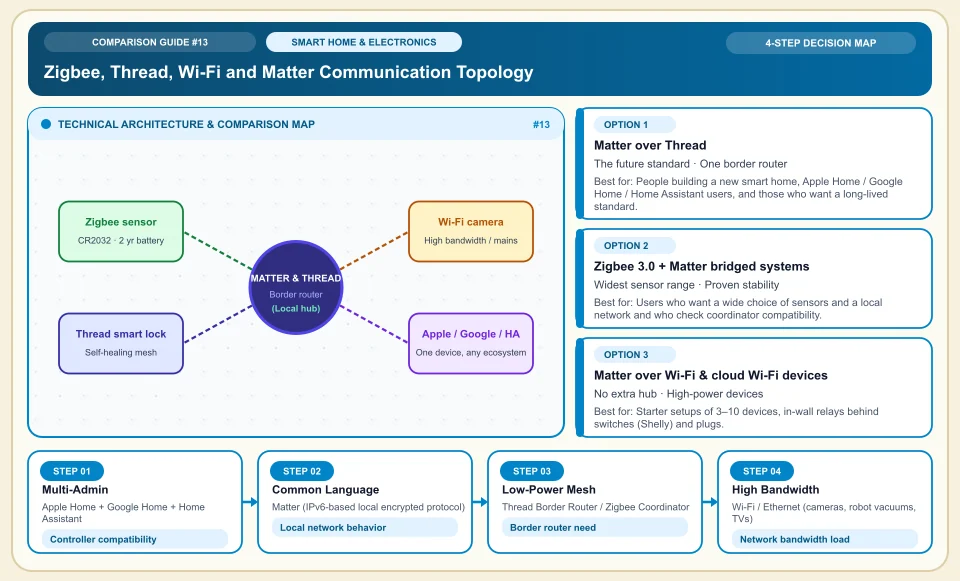
Matter compatibility in a smart home depends on the device, controller and network together.
Matter-compatible devices can work across supported ecosystems and can use local connectivity. Thread needs a suitable border router; Zigbee is a separate protocol and is not part of the same network without a Matter bridge. Battery life, command latency and behavior during an internet outage vary by setup.
Check that a device is truly Matter certified and which features it supports.
Confirm the border router and compatible controller a Thread device needs.
Try local automations in your own home with the internet off.
Zigbee, Thread, Wi-Fi and Matter Communication Topology
How the Matter application layer relates to Thread, Wi-Fi and separate Zigbee networks; Zigbee may need a bridge:
Apple Home + Google Home + Home Assistant
A Matter device that supports Multi-Admin can be shared across suitable controllers; verify device type and feature scope.
Matter (IPv6-based local encrypted protocol)
Matter allows local communication; app and cloud dependence varies with what the device does.
Thread Border Router / Zigbee Coordinator
A Thread border router and a Zigbee coordinator play different roles; battery-powered end devices are not repeaters.
Wi-Fi / Ethernet (cameras, robot vacuums, TVs)
Data-heavy devices can use Wi-Fi; network load depends on device count and use.
An Honest Comparison of the Different Types, Pros and Cons
See the bottlenecks that marketing brochures hide, how each type works, and who each architecture suits, side by side:
1. Matter over Thread (next-generation IPv6 mesh standard)
Matter over Thread needs a compatible border router; verify from the model which Apple, Google or other controller provides the function.
✅ Strengths (pros)
- It is a self-healing mesh: even if a device in the path is unplugged, sensors find another route within milliseconds.
- It can offer low energy use and local control; latency and cloud dependence depend on the device.
⚠️ Weaknesses & limits (cons)
- Matter device variety and price vary with device type and maker.
- Your home needs at least one main device that supports Thread Border Router (for example Apple TV 4K with Ethernet, HomePod mini, Aqara Hub M3 or Home Assistant SkyConnect).
People building a new smart home, Apple Home / Google Home / Home Assistant users, and those who want a long-lived standard.
2. Zigbee 3.0 + Matter bridged systems (Philips Hue, Aqara, IKEA Dirigera, Sonoff)
Devices talk to each other over a 2.4 GHz Zigbee mesh; the brand's own bridge (hub) or a universal USB coordinator (Zigbee2MQTT) turns them into Matter devices in bulk.
✅ Strengths (pros)
- There are hundreds of affordable, very sturdy devices, from water-leak sensors to curtain motors, relays and smart valves.
- Aqara, Hue and IKEA bridges have made the older Zigbee devices connected to them Matter-capable through an update.
⚠️ Weaknesses & limits (cons)
- If you use different brands' own closed Zigbee hubs, several boxes can pile up at the outlet (Home Assistant with a single USB coordinator solves this).
- Set the Zigbee channel (for example 15/20/25) so it does not overlap your 2.4 GHz Wi-Fi channel (for example 1/6/11).
Users who want a wide choice of sensors and a local network and who check coordinator compatibility.
3. Matter over Wi-Fi & cloud Wi-Fi devices (TP-Link Tapo, Shelly, Meross, Tuya)
Connects directly to your existing Wi-Fi router; Matter-capable ones are controlled over the local network without going out to the cloud.
✅ Strengths (pros)
- A small number of Wi-Fi devices may not need an extra hub in some setups; check the product's cloud dependence.
- Practical for always-powered devices that need energy metering and high-power control.
⚠️ Weaknesses & limits (cons)
- The number of Wi-Fi devices can strain your router and network capacity; there is no fixed device threshold.
- Battery use and trigger time of battery-powered sensors on Wi-Fi depend on the product's radio and sleep design.
Starter setups of 3–10 devices, in-wall relays behind switches (Shelly) and plugs.
Side-by-Side Technical Criteria and Performance Table
The core engineering, cost and usage parameters you can compare directly when deciding:
| Criterion | Matter over Thread | Zigbee 3.0 (Matter bridged) | Matter over Wi-Fi | Legacy Cloud Wi-Fi (Tuya etc.) | Engineering verdict |
|---|---|---|---|---|---|
| Works Without Internet | Local function depends on device and controller | Depends on bridge and coordinator | Depends on the device's cloud architecture | Does not work (cloud dependent) | The golden rule of smart homes: the switch must work when the internet is down. |
| Battery Sensor Life & Response | Battery and latency depend on the model | Battery and latency depend on the model | Battery and latency depend on the model | Battery and latency depend on the model | For battery sensors, review energy use model by model. |
| Load on Home Router | Separate radio network; measure local network impact | Separate radio network; measure local network impact | Medium/High (every device takes an IP) | High + constant outside traffic | Judge device count against router capacity and traffic. |
| Extra Hub / Bridge Need | Border router (Apple TV / Nest / hub) | Zigbee hub or USB dongle | None (straight to router) | None (straight to router) | Confirm your existing hub's Thread Border Router function. |
| Device Variety & Price | Growing fast (mid price) | Widest & most economical | Common in plugs/relays/bulbs | Very common but closed | Most flexible setup: Home Assistant + Thread & Zigbee hybrid. |
Providers and reference points
Providers, platforms or official information sources you can weigh against your own needs. The list is not a market-share ranking or a physical product test.
Aqara (Hub M3, P2 Thread Sensors, Zigbee Series)
- Aqara offers a range of sensors, motors and locks; Matter, Thread and Zigbee support varies by product.
- Some advanced device tuning needs its own app, or a Hub M3 / Home Assistant connection, at first setup.
Philips Hue (Signify) & IKEA Home Smart (Dirigera)
- Philips Hue leads in lighting with color accuracy, smooth dimming and a rock-solid Hue Bridge (Matter-capable); IKEA offers affordable sensors and remotes.
- Lighting prices vary by model and market; compare current offers.
Shelly (Pro / Gen3 / Matter Series) & Sonoff
- Hidden behind your existing wall switches (inside the junction box), they keep the wall switch working normally while adding phone/Matter control and energy metering.
- Installation happens inside a mains-voltage junction box, so it requires checking the neutral wire and an electrician or technical knowledge.
Eve Systems, Nanoleaf & TP-Link Tapo (Matter Series)
- They offer Thread and Matter options; local operation and price features are verified model by model.
- Eve products carry premium prices; most of Tapo's economical models use Matter over Wi-Fi rather than Thread.
Category 2: Hardware, Smart Home & Consumer Electronics
Gaming and workstation hardware, 3-2-1 backup and NAS, Matter and Zigbee smart home protocols, 4G solar cameras, robot vacuums, PID espresso, online UPS, 3D printers, camera sensors and Wi-Fi 7 MLO.
Sources and review method
We checked the Matter application layer and multi-ecosystem scope against the standards body; battery life and latency vary by product. Translated and adapted for an international audience on 2026-11-03.
Sources checked:
- Connectivity Standards Alliance Matter overview ↗
Explains the scope of Matter interoperability and local connectivity; it does not guarantee every feature on every brand.
Frequently Asked Questions
Should I buy a smart bulb or put a smart relay behind the wall switch?
If you only need on/off for a ceiling fixture, a smart relay behind the wall switch (Shelly / Aqara / Sonoff) makes much more sense, because the system does not go offline when someone turns off the wall switch. For lamps where you want color temperature (warm/white) or RGB color changes, use a smart bulb plus a wireless scene button.
Can I install a smart switch if my wall switch has no neutral (blue) wire?
In many buildings, especially older ones, only the live wire reaches the switch box and the neutral is in the junction box or at the ceiling light. In that case you can either put a relay in the junction box or use Aqara/Sonoff's dedicated no-neutral Zigbee smart switches (note that no-neutral models do not act as signal repeaters/routers).
Does every device with the Matter logo work with both iPhone and Android?
The Matter logo aims for interoperability within the certified device type; verify feature and controller support on the product page.