
Mesh Wi-Fi 6E/7, Ethernet backhaul and wireless extenders compared by home layout and device compatibility.
In mesh Wi-Fi, your home's layout and the link between nodes matter at least as much as the standard's name.
Walls, distance and interference affect wireless coverage and speed. TP-Link says a wired backhaul can be more stable and faster; it does not promise a fixed speed loss or full speed for every home. An extra node helps only if it fixes a measured dead spot.
Measure coverage and speed in your home and place nodes accordingly.
If you have Ethernet cabling, try a supported wired backhaul.
For Wi-Fi 7 or MLO, verify compatibility on both the client and the network device.
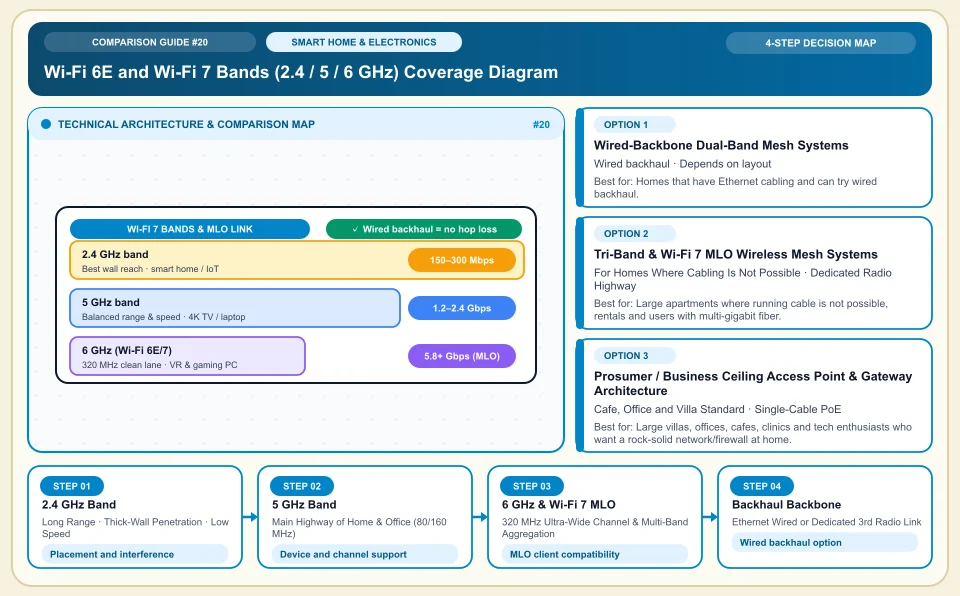
Wi-Fi 6E and Wi-Fi 7 Bands (2.4 / 5 / 6 GHz) Coverage Diagram
The trade-off between higher speed and weaker wall penetration as frequency rises, and the wired / tri-band backhaul backbone:
Long Range · Thick-Wall Penetration · Low Speed
2.4 GHz coverage depends on walls and interference; no specific wall count or speed is guaranteed.
Main Highway of Home & Office (80/160 MHz)
5 GHz data rate and latency vary with channel width, client and wall structure.
320 MHz Ultra-Wide Channel & Multi-Band Aggregation
6 GHz channel and MLO support depend on the device and local rules; neighbor interference does not vanish entirely.
Ethernet Wired or Dedicated 3rd Radio Link
Ethernet backhaul cuts the load of wireless hops; end-to-end speed is still limited by ports and your internet plan.
An Honest Comparison of the Different Types, Pros and Cons
See the bottlenecks that marketing brochures hide, how each type works, and who each architecture suits, side by side:
1. Wired-Backbone (Ethernet Backhaul) Dual-Band Mesh Systems (TP-Link Deco X50/X60, Asus ZenWiFi, Keenetic)
The mesh units in the living room and back room are linked by Ethernet (CAT6) cable in the walls, leaving all the wireless capacity to your devices.
✅ Strengths (pros)
- A wired node link can reduce radio backhaul load; end speed depends on ports, internet plan and client.
- Wired backhaul reduces how much walls affect the radio link between nodes; latency and packet loss should still be measured.
⚠️ Weaknesses & limits (cons)
- Requires in-wall network cable between rooms (or thin flat CAT6 run along the baseboard).
- Wireless backhaul performance depends on distance, interference and node design.
Homes that have Ethernet cabling and can try wired backhaul.
2. Tri-Band & Wi-Fi 7 MLO Wireless Mesh Systems (Deco BE65/XE75, Asus ZenWiFi BT/ET)
Two mesh units use the 6 GHz band (or the Wi-Fi 7 MLO combined link) as a dedicated wireless bridge to talk to each other.
✅ Strengths (pros)
- Wireless mesh nodes can extend coverage without cabling; end speed depends on placement and backhaul.
- A separate backhaul radio can reduce sharing a band with clients; verify the model's architecture.
⚠️ Weaknesses & limits (cons)
- Thick walls can weaken the wireless backhaul; place nodes by measurement.
- Tri-band devices are priced differently from dual-band models; compare current offers.
Large apartments where running cable is not possible, rentals and users with multi-gigabit fiber.
3. Prosumer / Business Ceiling Access Point & Gateway Architecture (Ubiquiti UniFi, TP-Link Omada, MikroTik)
The router (gateway), PoE switch and sleek ceiling/wall-mounted access points are separate; the APs also get their power through the network cable (PoE).
✅ Strengths (pros)
- Business access points can offer more devices and network settings; capacity and isolation should be verified in your setup.
- Mounted on the ceiling at the best signal angle with a single Ethernet cable, with no outlet and adapter clutter.
⚠️ Weaknesses & limits (cons)
- Setup and VLAN/controller configuration take basic networking knowledge, unlike consumer "set up in 3 taps from the app" mesh kits.
- Gateway + PoE switch + AP are bought separately, so the starting investment is higher.
Large villas, offices, cafes, clinics and tech enthusiasts who want a rock-solid network/firewall at home.
Side-by-Side Technical Criteria and Performance Table
The core engineering, cost and usage parameters you can compare directly when deciding:
| Criterion | Wired Backhaul Mesh | Tri-Band / Wi-Fi 7 Wireless Mesh | Business PoE AP (UniFi/Omada) | Cheap Plug-In Repeater | Verdict |
|---|---|---|---|---|---|
| Speed Loss in the Back Room | Depends on port and client speed | Depends on placement and radio capacity | Depends on port and client speed | Depends on the repeater and placement | Cheap plug-in repeaters can halve speed; set up a mesh or AP instead. |
| Roaming Between Rooms | Depends on client roaming support | Depends on client roaming support | Seamless (central controller) | Drops on handoff (separate SSID) | Test roaming support with your clients and access points. |
| Cable Requirement | CAT6 Ethernet needed | Just a power outlet | PoE CAT6 to the ceiling/wall | Just an outlet | If you have no cable, test the wireless backhaul option in your home. |
| VLAN & IoT Network Isolation | Basic (guest network) | Basic (guest/IoT network) | Full business VLAN & firewall | None | A VLAN is very safe for separating smart-home devices from your main computer. |
| Value for Money | Must be measured for your home layout | Medium/High (comfort-focused) | Very high in the long run | Throwing money away | Compare the cost of wired backhaul against the price of a wireless system for the same home. |
Providers and reference points
Providers, platforms or official information sources you can weigh against your own needs. The list is not a market-share ranking or a physical product test.
TP-Link Deco Series (Deco X50 / X60 / XE75 / BE65 Wi-Fi 7)
- Deco models come with an app and multi-pack options; check the product list for mixing old and new models.
- Advanced network settings (detailed SQM/QoS, channel width locking, multiple VLANs) are only available through the mobile app, which can feel basic to power users.
Keenetic (Hopper, Sprinter, Peak, Titan + KeeneticOS)
- Some router models offer advanced VPN and network settings; check ONT, PPPoE/VLAN and service compatibility.
- Its high-end Wi-Fi 7 (6 GHz) hardware range arrives more gradually than TP-Link's and Asus's.
Asus (ZenWiFi & ROG Rapture Series)
- With AiMesh any two Asus routers can form a mesh, the AiProtection firewall is free for life (no subscription), and it offers advanced gaming/VPN prioritization.
- Tri-band ZenWiFi packs are priced at the upper end versus rivals.
Ubiquiti UniFi (Cloud Gateway Ultra/Max + U6/U7 Pro AP) & TP-Link Omada
- Offers traffic analytics, ad blocking, dual-WAN aggregation and ceiling PoE access points that run for years without a restart, with business-grade stability.
- Devices are chosen modularly (gateway + switch + AP) rather than as one package, and setup takes basic networking knowledge.
Category 2: Hardware, Smart Home & Consumer Electronics
Gaming and workstation hardware, 3-2-1 backup and NAS, Matter and Zigbee smart home protocols, 4G solar cameras, robot vacuums, PID espresso, online UPS, 3D printers, camera sensors and Wi-Fi 7 MLO.
Sources and review method
We checked the mesh placement and wired backhaul advice against the manufacturer's support document; speed and coverage planning must be measured in your home.
Sources checked:
- TP-Link Deco placement guide ↗
Explains the effect of walls and placement and the advantage of Ethernet backhaul; it gives no speed ratio for any particular home.
Frequently Asked Questions
There is no signal in the back room; should I put the second mesh unit right in that back room?
With wireless backhaul, the second node must receive a good signal from the main node. Measure the signal in a hallway or middle room and try placing it there.
Can I remove the fiber modem my ISP gave me and plug in my own mesh system directly?
Using your own router directly with the ONT depends on your ISP's PPPoE/VLAN and equipment rules. You can also try the ISP modem together with an access point mode.
Do my phone and computer also need Wi-Fi 7 to benefit from a Wi-Fi 7 router?
Backhaul between Wi-Fi 7 nodes can help in some setups; verify MLO, 6 GHz, regional and client conditions in the product documentation.