
Next-generation high-speed CoreXY FDM printers (Bambu Lab, Creality, Prusa) vs MSLA resin printers, with a mechanical comparison of PLA, PETG, ABS/ASA and TPU filaments.
When choosing a 3D printer, decide on the part's use, the material and safe working conditions first.
CoreXY and auto-calibration can cut setup effort but do not guarantee a given speed or a flawless result on every print. FDM and resin printing differ in detail, materials and post-processing. Prusa recommends gloves and ventilation when working with resin.
Pick the material for the part size, detail and operating temperature you need.
Try the manufacturer profile's print time and material settings on a sample part.
When using resin, follow the product's safety data sheet and ventilation instructions.
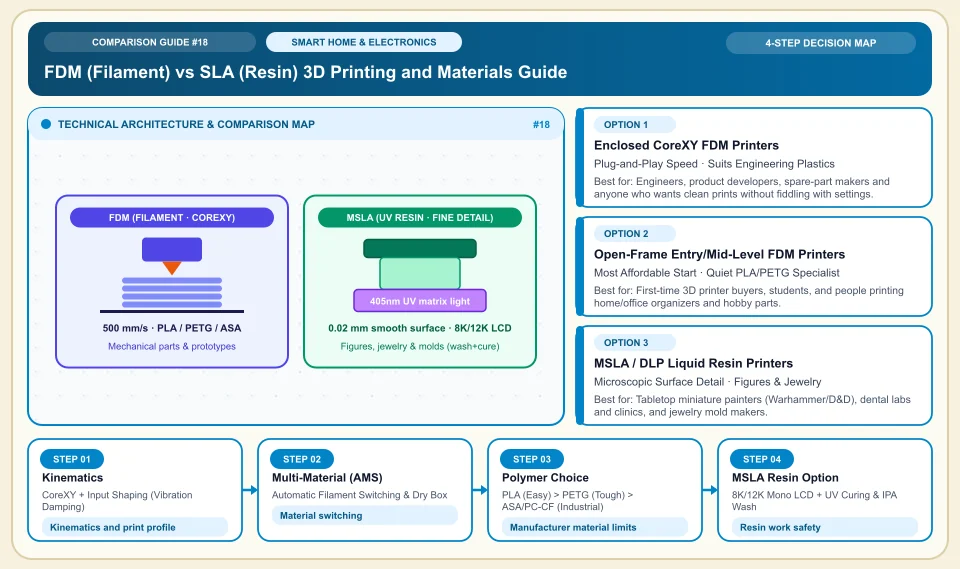
FDM (Filament) vs SLA (Resin) 3D Printing and Materials Guide
How thermoplastic melting (FDM CoreXY) and UV curing of liquid resin (MSLA) work, plus the heat/strength scale of engineering filaments:
CoreXY + Input Shaping (Vibration Damping)
Input shaping can reduce vibration; print time and artifacts depend on geometry and profile settings.
Automatic Filament Switching & Dry Box
Switches colors, or main and support material, automatically in one print; moves to a backup spool when one runs out.
PLA (Easy) > PETG (Tough) > ASA/PC-CF (Industrial)
Heat and strength limits vary with filament type, brand and print parameters.
8K/12K Mono LCD + UV Curing & IPA Wash
Resin printing needs gloves, proper washing and ventilation; follow the resin's safety data sheet.
An Honest Comparison of the Different Types, Pros and Cons
See the bottlenecks that marketing brochures hide, how each type works, and who each architecture suits, side by side:
1. Enclosed CoreXY FDM Printers (Bambu Lab P1S / X1C / H2D, Creality K1C/K2, Prusa Core One)
The bed moves only on the Z axis (up and down) while a light extruder head flies fast on the X and Y axes on belts; a closed chamber around it holds the heat.
✅ Strengths (pros)
- Not affected by drafts, it prints strong, heat-resistant plastics such as ABS, ASA, PC and carbon fiber (PA-CF) without warping.
- Works fully integrated with multi-color/multi-material units (AMS / CFS).
⚠️ Weaknesses & limits (cons)
- Costs more than open-frame entry-level printers.
- Multi-color prints produce purge waste (poop) at every color change.
Engineers, product developers, spare-part makers and anyone who wants clean prints without fiddling with settings.
2. Open-Frame Entry/Mid-Level FDM Printers (Bambu Lab A1 / A1 Mini, Ender 3 V3)
On an open frame, with auto-calibration and quick nozzle swaps, it prints PLA, PETG and flexible TPU filaments.
✅ Strengths (pros)
- Offers fully automatic flow/bed calibration and very quiet operation at a very reasonable price.
- PLA cools better in open air, giving excellent surface quality on decorative items, boxes and prototypes.
⚠️ Weaknesses & limits (cons)
- Because it is open, it is not suited to high-temperature, smelly plastics such as ABS and ASA.
- On very tall, thin parts the bed moves back and forth, so speed has to be reduced in the upper layers.
First-time 3D printer buyers, students, and people printing home/office organizers and hobby parts.
3. MSLA / DLP Liquid Resin Printers (Elegoo Saturn/Mars, Anycubic Photon)
It cures each layer at once from beneath a vat of liquid photopolymer resin using a high-resolution (8K-16K) UV LCD screen.
✅ Strengths (pros)
- MSLA can deliver fine detail; layer lines depend on resin, screen and print settings.
- Several parts on one plate can cut print time; part height and layout limits apply.
⚠️ Weaknesses & limits (cons)
- Resin work needs gloves, proper ventilation, and washing and curing as the manufacturer specifies; follow the safety data sheet.
- Standard resin parts are glass-brittle; they are not as durable as FDM for geared or load-bearing parts.
Tabletop miniature painters (Warhammer/D&D), dental labs and clinics, and jewelry mold makers.
Side-by-Side Technical Criteria and Performance Table
The core engineering, cost and usage parameters you can compare directly when deciding:
| Criterion | Enclosed CoreXY FDM | Open Next-Gen FDM (A1 etc.) | MSLA Liquid Resin | Verdict |
|---|---|---|---|---|
| Mechanical Strength & Spares | Depends on material and print profile | Good (PLA, PETG, TPU) | Low/Medium (brittle resin) | For functional parts that must not snap, choose FDM + PETG/ASA. |
| Micro Detail & Surface Smoothness | Depends on layer and nozzle settings | Depends on layer and nozzle settings | Fine detail, depending on resin and layer settings | Compare sample prints for the detail a small figure needs. |
| Cleanliness & Safety | Clean (dry filament + carbon filter) | Very clean (odorless PLA/PETG) | Hard (gloves, mask, alcohol wash) | Do not put a resin printer next to your desk at home; get an FDM printer. |
| Sun & Heat Resistance (In a Car) | Depends on filament and print orientation | Depends on filament and print orientation | Needs a special engineering resin | For a car phone holder, PLA will melt; use ASA or PETG. |
| Consumable Cost (per kg) | Economical (standard 1 kg spool) | Most economical (PLA/PETG spool) | High (resin + IPA alcohol + FEP) | For everyday prototypes and fixtures, filament is far cheaper. |
Providers and reference points
Providers, platforms or official information sources you can weigh against your own needs. The list is not a market-share ranking or a physical product test.
Bambu Lab (A1 Mini / A1, P1S Combo, X1 Carbon, H2D)
- Offers auto-calibration and multi-material options; speed and first-setup experience vary by model.
- Its spare parts and ecosystem are more closed than open-source (Klipper) community machines.
Prusa Research (Core One, MK4S) & Creality (K1C, K2 Plus) & Qidi Tech
- Prusa, Creality and Qidi offer different repair, enclosure and software options; compare strength and price model by model.
- Prusa's unit price is high; with Creality, the slicer experience is best supplemented with Bambu Studio/OrcaSlicer.
Filament Makers (eSUN, Polymaker, Bambu Lab)
- Different filament makers offer different material profiles; verify diameter tolerance and mechanical data from the product's technical sheet.
- PETG, TPU and nylon can be affected by moisture; choose the drying temperature from the filament maker's instructions.
Category 2: Hardware, Smart Home & Consumer Electronics
Gaming and workstation hardware, 3-2-1 backup and NAS, Matter and Zigbee smart home protocols, 4G solar cameras, robot vacuums, PID espresso, online UPS, 3D printers, camera sensors and Wi-Fi 7 MLO.
Sources and review method
We checked resin safety against the manufacturer's instructions; speed, strength and material choice must be tested with your printer and filament profile.
Sources checked:
- Prusa resin safety ↗
Explains the need for gloves and ventilation when working with resin; it does not confirm FDM print speed or any material's superiority.
Frequently Asked Questions
Which filament should I use where: PLA, PETG or ASA?
The heat and impact behavior of PLA, PETG and ASA depends on the product and print parameters. Read the manufacturer's technical data sheet against the temperature where the part will be used.
What should I watch for when printing carbon fiber (CF) or glow-in-the-dark filament?
Filaments with abrasive additives can affect nozzle life; check for a hardened nozzle and the maker's material profile.
Why does a part not stick to the bed and lift at the corners?
The first cause is a textured PEI plate dirtied by fingerprint oil: wash it with dish soap and hot water and dry it, rather than wiping it with alcohol (alcohol only spreads the oil). The second cause is a cold draft in the room.