
Comparing CPU, network, storage and billing items across shared vCPU, dedicated resources and hyperscale cloud services.
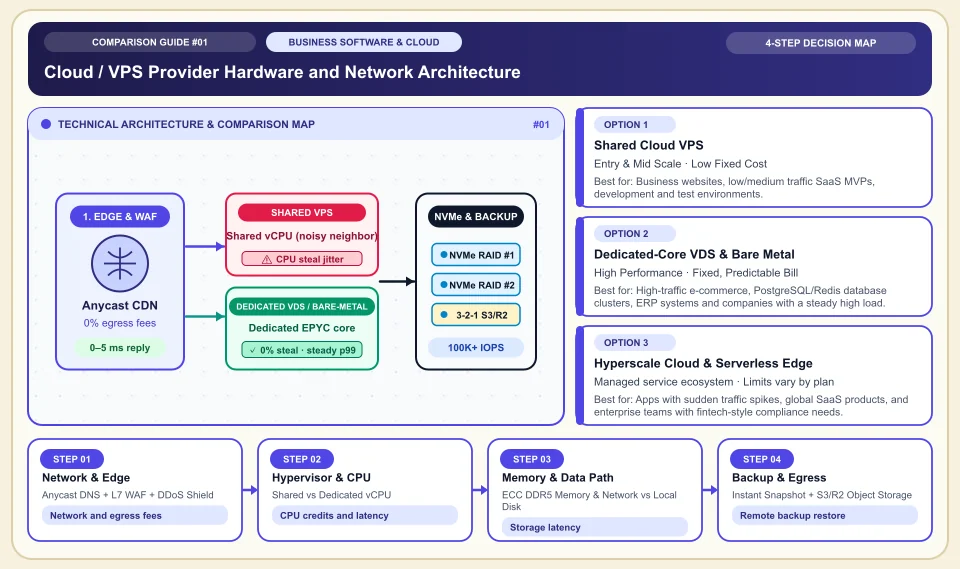
Choose a cloud server by measuring CPU, storage, network and data egress cost on the same workload.
Shared and burstable processors can also work for small and variable workloads. For applications that need sustained high CPU, track the CPU credit model, latency and the total bill. Cloudflare R2 charges no data egress fee, while storage and operation fees continue. There is no universal savings percentage across providers.
For databases with sustained CPU use, compare dedicated resources and managed options with a load test.
Calculate egress, storage and operation fees in the same monthly usage scenario.
Keep backups somewhere separate from the main server and try restoring them.
Cloud / VPS Provider Hardware and Network Architecture
Bottleneck points from the edge/WAF layer through the hypervisor and vCPU scheduler to the NVMe storage pool:
Anycast DNS + L7 WAF + DDoS Shield
A WAF and cache can answer some requests before they reach the origin server; data transfer and request fees are calculated per plan.
Shared vs Dedicated vCPU
On shared CPU, neighboring workloads can affect latency; with dedicated vCPU too, confirm the allocation terms with the provider.
ECC DDR5 Memory & Network vs Local Disk
The latency gap between network and local storage depends on workload and configuration; run a database test.
Instant Snapshot + S3/R2 Object Storage
A snapshot in the same data center as the server is not disaster recovery; encrypted backups should be copied to a different region.
An Honest Comparison of the Different Types, Pros and Cons
See the bottlenecks that marketing brochures hide, how each type works, and who each architecture suits, side by side:
1. Shared Cloud VPS (Shared / Burstable vCPU)
The cores of a physical EPYC/Xeon processor are shared among several customers' virtual machines through time-slicing.
✅ Strengths (pros)
- Set up in minutes, with a very low hourly or monthly starting cost.
- More than enough for low and medium traffic business websites, staging/test servers and microservices.
⚠️ Weaknesses & limits (cons)
- When neighboring virtual machines come under heavy load, "CPU steal" rises and response times (p99 latency) fluctuate.
- Check your plan for the credit or fair-use policy under long-running CPU load.
Business websites, low/medium traffic SaaS MVPs, development and test environments.
2. Dedicated-Core VDS & Bare Metal (Dedicated vCPU / Physical)
On a dedicated physical server the machine is reserved for one customer; for dedicated vCPU offers, allocation and physical sharing terms vary by provider.
✅ Strengths (pros)
- Dedicated CPU allocation and local NVMe can give more predictable resource behavior; measure IOPS.
- Price and included traffic depend on region, hardware and support level; compare like-for-like baskets.
⚠️ Weaknesses & limits (cons)
- Setting up automatic horizontal scaling and managed PaaS services takes DevOps skills.
- Failover for a physical hardware failure has to be designed at the application layer.
High-traffic e-commerce, PostgreSQL/Redis database clusters, ERP systems and companies with a steady high load.
3. Hyperscale Cloud & Serverless Edge (AWS / GCP / Azure / Cloudflare)
Hundreds of managed services (managed DB, queues, AI, serverless workers) run with automatic scaling across global data centers.
✅ Strengths (pros)
- Managed scaling options exist; review the limits and cost service by service.
- Managed databases, IAM, compliance certifications and global CDN/edge integration are ready to use.
⚠️ Weaknesses & limits (cons)
- Micro-charges for data egress, NAT gateways, static IPs and IOPS can produce a surprise bill at month end if unchecked.
- Heavy dependence on platform-specific services (vendor lock-in) makes moving to another provider harder.
Apps with sudden traffic spikes, global SaaS products, and enterprise teams with fintech-style compliance needs.
Side-by-Side Technical Criteria and Performance Table
The core engineering, cost and usage parameters you can compare directly when deciding:
| Criterion | Shared VPS | Dedicated VDS / Bare Metal | Hyperscale & Edge Cloud | Engineering Decision |
|---|---|---|---|---|
| CPU consistency (p99 latency) | Variable (depends on neighbor load) | Depends on allocation and physical design | Depends on the chosen class and workload | Verify the latency target for database and payment workloads with a real load test. |
| Bandwidth & egress cost | Depends on the plan's included traffic | Depends on the plan's included traffic | Depends on the service; R2 egress is free | For media/file traffic, egress fees can exceed the server rental. |
| Managed services & automation | Basic (snapshot, firewall) | Medium (your own Kubernetes/Docker setup) | Full (managed DB, IAM, serverless) | Without a DevOps team, managed services save time. |
| Data center & data-protection compliance | Depends on region choice | Region options vary by provider | Global + local PoPs | For personal data, location and the encryption contract terms are critical; check your local data-protection law. |
| Total cost of ownership (TCO) | Starting cost depends on the offer | Calculate separately for steady load | Flexibility and cost depend on service choice | Keep the steady load on VDS and the sudden spikes on the edge/serverless layer. |
Providers and reference points
Providers, platforms or official information sources you can weigh against your own needs. The list is not a market-share ranking or a physical product test.
Hetzner Cloud & Dedicated
- Offers cloud and physical server plans; vCPU type, NVMe and included traffic vary by product.
- Check the data center location and real-user measurements against your latency target.
Cloudflare Workers + D1 / R2
- R2 has no data egress fee; storage and operations may be charged. Limits of Workers, D1 and network services are reviewed separately.
- Designed for modern distributed/serverless architectures, not for traditional long-running monolithic Linux processes or heavy local disk writes.
AWS (Amazon Web Services) & Google Cloud (GCP)
- The global standard, with hundreds of mature managed services such as RDS, BigQuery, Cloud Run and EKS, plus enterprise security and compliance ecosystems.
- Without FinOps tracking, NAT gateway, data transfer (egress) and IOPS items can make the bill quickly unpredictable.
DigitalOcean & Linode (Akamai)
- Offers managed databases and app options; setup time, features and price depend on the plan.
- Compare the same resource, traffic and support package using current offers; check that the networking and IAM features you need are in the chosen plan.
Category 1: Business Software, Cloud & B2B Infrastructure
Cloud server architecture, website builders, AI developer tools, CRM, business communication, project management and SEO decision matrices.
Sources and review method
We checked the CPU credit and R2 pricing models against official product documentation; speed, latency and total cost must be measured separately for each workload. Translated and adapted for an international audience on 2026-11-03.
Sources checked:
- AWS EC2 T3 instance types ↗
Explains how the burstable CPU credit model works in production use; it does not prove a cost percentage across providers.
- Cloudflare R2 pricing ↗
Shows that R2 has no data egress fee while storage and operation charges still apply.
Frequently Asked Questions
Why does the difference between VPS and VDS (dedicated vCPU) matter for my company?
Shared CPU is enough for some jobs; for sustained load or latency-sensitive work, test dedicated resources with the same application. A VDS label alone does not show the level of physical isolation.
What is the main reason a cloud server bill balloons unexpectedly at month end?
Data egress can be a major item on some plans; calculate storage, request and network fees together. R2's data egress is free, but it has other charges.
Should I install the company database on the server itself or choose a managed DB?
A managed database can offer backup and failover options; it does not remove the risk of data loss. Test restore and SLA terms.