
Comparing pipeline-focused CRMs for small teams on integrations, team use, automation and plan cost.
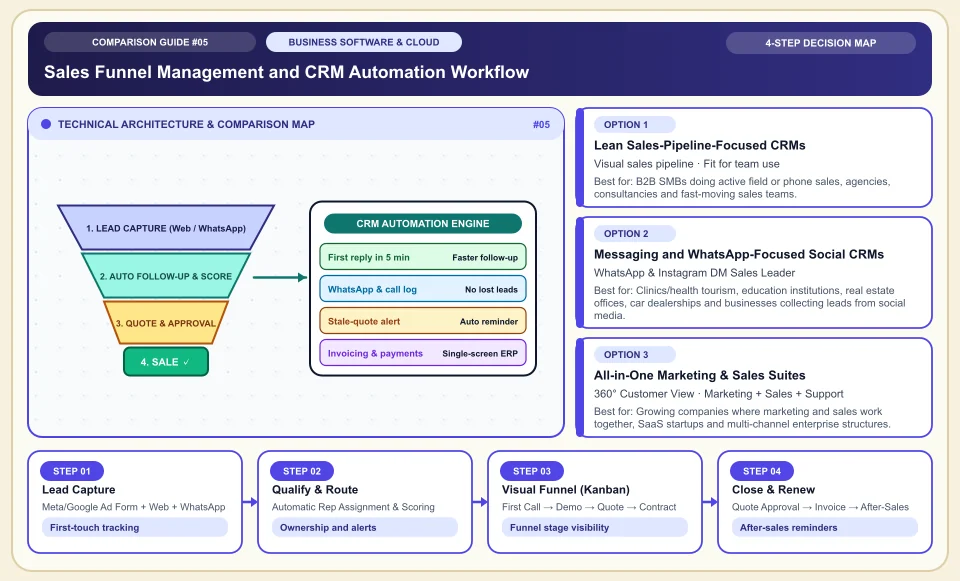
For a small business, CRM selection should start with a sales pipeline the team can sustain and the integrations it needs.
CRM adoption depends on usage habits, data load and setup quality; there is no failure rate that applies to all projects. HubSpot documentation shows sales stages and that some automations depend on subscription level. The product choice needs to be tried in the team's real follow-up workflow.
Try lead, quote and follow-up steps first in a small sales pipeline.
Check whether email, phone and messaging integrations are included in your own package.
Calculate the total cost as contacts and automation grow, using the vendor's quote.
Sales Funnel Management and CRM Automation Workflow
The architecture that turns a lead from an ad or web form into a quote and payment without getting lost:
Meta/Google Ad Form + Web + WhatsApp
If form and messaging connections can be set up, a lead card can be opened; integration scope depends on plan and permissions.
Automatic Rep Assignment & Scoring
Assignment and alert rules can reduce missed follow-ups; watch the rules working in a pilot.
First Call → Demo → Quote → Contract
See on one screen how much deal value is waiting at each stage and at which step customers drop off most.
Quote Approval → Invoice → After-Sales
Automation of invoicing and renewal steps depends on the product plan and integration.
An Honest Comparison of the Different Types, Pros and Cons
See the bottlenecks that marketing brochures hide, how each type works, and who each architecture suits, side by side:
1. Lean Sales-Pipeline-Focused CRMs (Pipedrive, Folk, Attio)
Designed directly around the salesperson's daily workflow (Kanban cards, activity tracking and closing quotes).
✅ Strengths (pros)
- A simple interface can make onboarding easier; adoption depends on the team's processes.
- A next-action field makes follow-up work visible; team usage still needs regular review.
⚠️ Weaknesses & limits (cons)
- Advanced marketing automation (newsletters to thousands of contacts, complex customer support ticketing) needs extra modules or integrations.
- Does not include multi-tier enterprise ERP/inventory management features.
B2B SMBs doing active field or phone sales, agencies, consultancies and fast-moving sales teams.
2. Messaging and WhatsApp-Focused Social CRMs (Kommo, Respond.io)
Puts WhatsApp Business API, Instagram DM and Telegram conversations at the center of the sales funnel rather than phone or corporate email.
✅ Strengths (pros)
- Collects WhatsApp conversations, which many customers prefer, in a shared team inbox; the conversation history stays with the company even if a salesperson leaves.
- Ready-made template messages and chatbots answer requests that arrive outside working hours right away.
⚠️ Weaknesses & limits (cons)
- Better suited to fast consumer/service sales than to long enterprise tenders and formal contract processes.
- The WhatsApp official API (Meta) per-conversation pricing must be budgeted separately.
Clinics/health tourism, education institutions, real estate offices, car dealerships and businesses collecting leads from social media.
3. All-in-One Marketing & Sales Suites (HubSpot, Zoho CRM, Bitrix24)
Keeps the entire cycle, from ad click to email automation, sales funnel and after-sales support ticket, in one database.
✅ Strengths (pros)
- Clearly measures how much revenue, not just how many form fills, each ad campaign actually brought (closed-loop attribution).
- Removes the hassle of connecting separate software tools as the company grows.
⚠️ Weaknesses & limits (cons)
- Although HubSpot looks cheap at the start, annual cost becomes very heavy for small businesses once you move to the Pro/Enterprise tier.
- If not configured properly at first setup, the team can get lost among hundreds of menus.
Growing companies where marketing and sales work together, SaaS startups and multi-channel enterprise structures.
Side-by-Side Technical Criteria and Performance Table
The core engineering, cost and usage parameters you can compare directly when deciding:
| Criterion | Lean Pipeline (Pipedrive) | WhatsApp / Social CRM (Kommo) | Integrated Suite (HubSpot / Zoho) | Engineering Decision |
|---|---|---|---|---|
| Setup & team ramp-up time | Depends on setup and team | Varies with API approval and setup | Depends on setup scope | Watch team adoption in a pilot. |
| WhatsApp & social DM handling | With an add-on (extra cost) | Built-in core feature | Higher plan or integration | If your sales happen on WhatsApp, choose a message-based CRM directly. |
| Marketing & ad ROI measurement | Basic (UTM / via integration) | Medium (ad-to-chat handoff) | Very high (end-to-end funnel analysis) | Critical for Google/Meta Ads conversion optimization (offline conversions). |
| Growth cost (price surprises) | Predictable (per user) | Predictable (user + Meta messaging) | High at HubSpot / economical at Zoho | Review price tables that multiply as contacts grow before signing a contract. |
| Accounting & phone-system bridge | Easy via Webhook / Zapier / Make | Cloud phone and messaging bridges ready | Wide app marketplace | Cloud telephony integration is essential for call recording. |
Providers and reference points
Providers, platforms or official information sources you can weigh against your own needs. The list is not a market-share ranking or a physical product test.
Pipedrive
- Offers Kanban and reminder features; usage rate should be measured in a team pilot.
- Built-in marketing automation and customer support modules are basic; extras (LeadBooster etc.) are added to the bill.
Zoho CRM (and Zoho One)
- Offers the advanced automation, custom modules and reporting power of HubSpot and Salesforce at a much more accessible cost.
- The dense interface and settings menus can feel complex at first setup; it needs a good initial configuration.
HubSpot CRM
- A free starter tier, a polished user experience and the ability to join marketing/ad/email data with sales make it the most refined solution in the sector.
- The price cliff when moving from the free/Starter plan to Professional (onboarding fee + per-seat increase) strains small businesses.
Kommo (formerly amoCRM)
- Connects all customer messages arriving through WhatsApp, Instagram and Telegram directly to sales cards and lets you build a no-code chatbot.
- Designed for fast, messaging-focused sales processes rather than classic heavy B2B enterprise quote/tender management.
Category 1: Business Software, Cloud & B2B Infrastructure
Cloud server architecture, website builders, AI developer tools, CRM, business communication, project management and SEO decision matrices.
Sources and review method
We checked the sales pipeline and plan restrictions against the official product documentation; adoption and price outcomes need business data. Translated and adapted for an international audience on 2026-11-03.
Sources checked:
- HubSpot object pipelines ↗
Explains sales pipeline stages and automation permissions that vary by plan; it does not prove a CRM failure rate.
Frequently Asked Questions
When should we move from an Excel or Google Sheets table to CRM software?
Once two or more people start talking to customers, and the answer to "Who called this customer, when, and what did they promise?" gets lost in WhatsApp on personal phones, you have outgrown Excel.
What should we do so that customer data and WhatsApp conversations are not lost when a salesperson leaves?
Instead of personal phone lines, use a CRM integrated with the corporate WhatsApp Business API and a cloud phone system (VoIP). That way all conversations, call recordings and customer history stay in the company's central CRM account, not on a person's phone.
Does connecting forms from Google Ads and Meta ads to the CRM reduce ad costs?
Yes. When you mark in the CRM which lead actually bought and send that back to Google and Meta via "Offline Conversion API", the ad algorithm learns to find the profile of customers who actually spend money instead of empty clicks.