
An in-depth comparison of inline completion plugins (GitHub Copilot), AI-native IDEs (Cursor, Windsurf) and autonomous terminal/cloud agents (Claude Code, OpenAI Codex).
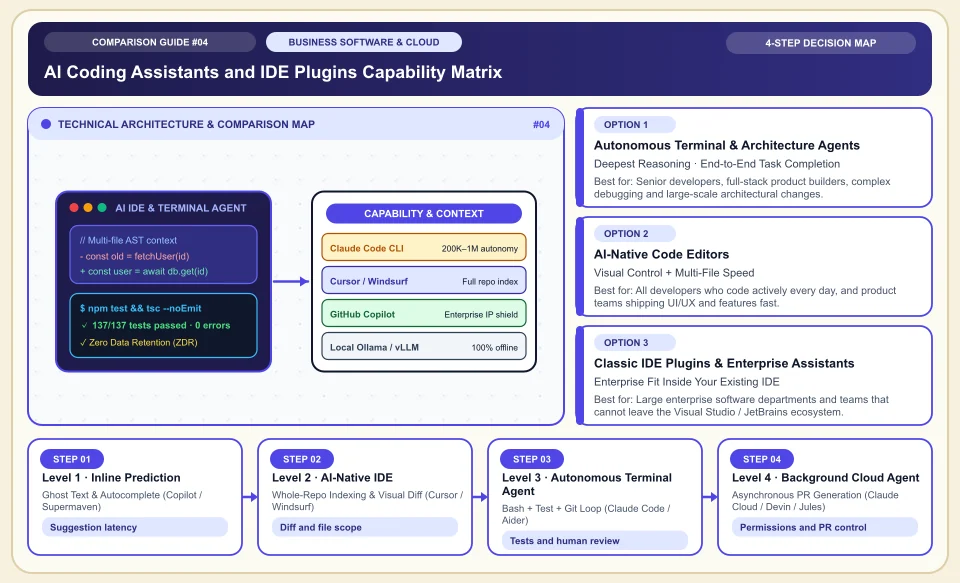
Evaluate AI coding tools on line completion, multi-file editing and an agent workflow that needs human review.
A tool can suggest code, change files or run tests; the result still has to be reviewed in the project context. GitHub documentation clearly stresses the cloud agent's permission limits and human review. Model success rankings, latency and data retention terms change with plans, so there is no single universal winner.
Run the same small task with candidate tools and compare the diff and test results.
Keep human review and required checks for PRs opened by an agent.
Verify how code is processed and stored in the contract for the relevant plan.
AI Coding Assistants and IDE Plugins Capability Matrix
Evolution from inline prediction (L1) to multi-file IDE editors (L2) and autonomous terminal/cloud agents that run their own tests (L3):
Ghost Text & Autocomplete (Copilot / Supermaven)
The value of an inline suggestion depends on the task and project context; measure the speed gain on the same task.
Whole-Repo Indexing & Visual Diff (Cursor / Windsurf)
An IDE can propose changes across several files; scope and diff review depend on tool features.
Bash + Test + Git Loop (Claude Code / Aider)
Agents can run commands and tests; bug fixes and passing tests are not guaranteed without human review.
Asynchronous PR Generation (Claude Cloud / Devin / Jules)
Some cloud agents can prepare branches or PRs; verify permissions, duration and test coverage in your plan.
An Honest Comparison of the Different Types, Pros and Cons
See the bottlenecks that marketing brochures hide, how each type works, and who each architecture suits, side by side:
1. Autonomous Terminal & Architecture Agents (Claude Code, OpenAI Codex CLI, Aider)
Works in an agentic loop directly in the operating system shell, file system and Git, not confined to an IDE interface.
✅ Strengths (pros)
- Can find the relevant files in a repository and propose changes; when it runs build and test commands, a human should review the result.
- Works with the same power in any environment: VS Code, JetBrains, Neovim or a remote SSH server.
⚠️ Weaknesses & limits (cons)
- Heavy reasoning and wide context use make API/token consumption higher than standard autocomplete tools.
- Being terminal-based, it may feel unfamiliar at first to beginners used to visual drag-and-drop (a VS Code extension helps).
Senior developers, full-stack product builders, complex debugging and large-scale architectural changes.
2. AI-Native Code Editors (Cursor, Windsurf)
Built as a VS Code fork; AI chat, codebase indexing and a multi-file editor (Composer/Cascade) are at the heart of the editor.
✅ Strengths (pros)
- Offers a line-by-line change view and code completion; speed and suggestion quality depend on task context.
- Gives the flexibility to switch between Claude, GPT and its own fast models with one key.
⚠️ Weaknesses & limits (cons)
- Creates a switching cost for teams tied to an IDE other than VS Code (for example full IntelliJ IDEA or Rider).
- When the "fast request" quota in the monthly fixed plan runs out, extra usage fees or queue waits can occur.
All developers who code actively every day, and product teams shipping UI/UX and features fast.
3. Classic IDE Plugins & Enterprise Assistants (GitHub Copilot, JetBrains AI)
Installed as a plugin in the VS Code, Visual Studio or JetBrains IDE you already use; integrates with GitHub/Azure enterprise authorization.
✅ Strengths (pros)
- Before rolling out to a team, license, admin settings, data access and security policies should be evaluated.
- Directly integrated with GitHub PR summaries, code review and Actions workflows.
⚠️ Weaknesses & limits (cons)
- Autonomous multi-step agent abilities and depth of whole-repo understanding generally trail Cursor and Claude Code by a step.
- With a narrow context window, it can miss types in a neighboring file in large projects.
Large enterprise software departments and teams that cannot leave the Visual Studio / JetBrains ecosystem.
Side-by-Side Technical Criteria and Performance Table
The core engineering, cost and usage parameters you can compare directly when deciding:
| Criterion | Autonomous Agent (Claude Code) | AI-Native IDE (Cursor / Windsurf) | IDE Plugin (GitHub Copilot) | Engineering Decision |
|---|---|---|---|---|
| Multi-file architectural change | Depends on task and tool permissions | High (with Composer / Cascade) | Medium (Copilot Edits / Agent mode) | For multi-file changes, compare diff, tests and team fit. |
| Inline quick completion (Tab) | None (task/agent focused) | Depends on product feature | Very good (standard ghost text) | Try the same task in each tool and compare diff and test quality. |
| Automatic test running & repair | Fully native (terminal loop) | Supported (in Agent mode) | Limited / needs approval | An AI that does not actually run the tests can hallucinate; verification is essential. |
| Model choice flexibility | Anthropic Claude (Opus/Sonnet) | Multi-model (Claude, GPT, Gemini) | Multi-model (OpenAI, Claude, Gemini) | Code quality is determined by task context, tool permissions and review as much as by the model. |
| Enterprise data privacy | ZDR & enterprise API support | Privacy depends on plan terms | GitHub Enterprise IP protection | When protecting client code, opting out of training (Privacy Mode) is a must. |
Providers and reference points
Providers, platforms or official information sources you can weigh against your own needs. The list is not a market-share ranking or a physical product test.
Claude Code (Anthropic)
- Understands the codebase with surgical precision; runs git history, tests and build tools on its own to complete the toughest architectural tasks in one pass.
- Not an inline autocomplete (Tab) tool; it works per task and can consume many tokens under heavy use.
Cursor
- Speeds up everyday coding with "Cursor Tab", which predicts where to jump next, a multi-file Agent mode and a visual diff review experience.
- Being VS Code based, it requires heavy JetBrains (IntelliJ/Rider) users to switch shortcuts and ecosystem.
Windsurf (Codeium)
- Offers a clean, fast experience with the "Cascade" context engine that automatically tracks the developer's latest terminal and file actions.
- Its plugin ecosystem and community templates may not be as broad as Cursor and standard VS Code.
GitHub Copilot
- Offers GitHub PR reviews, enterprise license management and official plugin support in all major IDEs, including JetBrains/Visual Studio.
- Its autonomous depth on large, complex tasks is more conservative than dedicated terminal agents.
Category 1: Business Software, Cloud & B2B Infrastructure
Cloud server architecture, website builders, AI developer tools, CRM, business communication, project management and SEO decision matrices.
Sources and review method
We checked the agent workflow and review requirement against the official documentation; model speeds, success rates and privacy terms vary by product and plan. Translated and adapted for an international audience on 2026-11-03.
Sources checked:
- GitHub Copilot cloud agent risks and mitigations ↗
Explains human review and permission limits for the cloud coding agent; it gives no model success ranking.
Frequently Asked Questions
Are Cursor and Claude Code rivals, or are they used together?
The most productive engineers use both: they keep Cursor open for everyday quick file navigation and instant line completion (Tab), and run Claude Code in the terminal to code a complex feature end to end and verify its tests.
When coding with AI, are my company's source code used to train other people's models?
Whether code is used for training or retained depends on the product and plan contract. Verify privacy settings and data processing terms.
How do I review code written by AI?
Use diffs, tests, security scanning and human review. These reduce risk; they do not guarantee error-free code.