
Comparing business email suites on authentication, storage, office tools and administration.
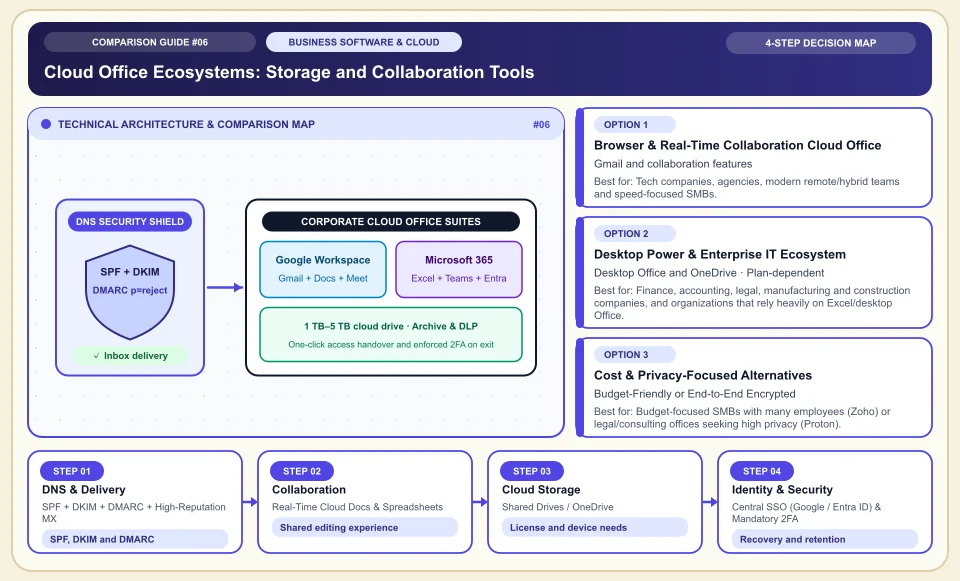
In business email, evaluate authentication, sending habits and support together.
Records such as SPF, DKIM and DMARC help verify email identity; on their own they do not guarantee inbox delivery. Google's sender guidelines explain that domain reputation and sending behavior matter too. Choose an office suite according to your collaboration, desktop app and administration needs.
Match your domain's SPF, DKIM and DMARC setup to your sending service.
Test your shared-document and desktop-app needs inside the team.
Verify the licenses needed for each user type and the migration support.
Cloud Office Ecosystems: Storage and Collaboration Tools
Layers of business email deliverability, real-time shared document editing and identity management (SSO):
SPF + DKIM + DMARC + High-Reputation MX
SPF, DKIM and DMARC help with domain verification; inbox delivery is not guaranteed.
Real-Time Cloud Docs & Spreadsheets
Shared editing and comments are possible through a single link; the limit on simultaneous participants depends on the plan.
Shared Drives / OneDrive
Even if an employee's computer breaks or they leave, all company folders stay safe in the cloud under a permissions matrix.
Central SSO (Google / Entra ID) & Mandatory 2FA
Central account management can simplify access for new and departing employees; app permissions still need separate verification.
An Honest Comparison of the Different Types, Pros and Cons
See the bottlenecks that marketing brochures hide, how each type works, and who each architecture suits, side by side:
1. Browser & Real-Time Collaboration Cloud Office (Google Workspace)
Gmail, Google Drive, Docs, Sheets and Meet are fully cloud-native and sync across browser and mobile.
✅ Strengths (pros)
- Offers Gmail search, spam filtering and shared document editing; results depend on account settings and use.
- Can centralize access for apps that use SSO; each app has its own connection and license terms.
⚠️ Weaknesses & limits (cons)
- Accounting/finance units that use very heavy financial Excel models (VBA macros, million-row PowerQuery connections) may struggle in Google Sheets.
- The per-user subscription cost can strain the budget for large field teams.
Tech companies, agencies, modern remote/hybrid teams and speed-focused SMBs.
2. Desktop Power & Enterprise IT Ecosystem (Microsoft 365)
Combines desktop Office apps, Exchange and Teams options; OneDrive quota varies by license.
✅ Strengths (pros)
- Can offer OneDrive storage and desktop apps together; quota and price should be reviewed per license.
- The industry standard for desktop Excel, Power BI and enterprise Windows device management (Intune / Entra ID).
⚠️ Weaknesses & limits (cons)
- Web-based admin panels (Admin Center, Exchange, SharePoint) are far more complex and fragmented than Google Workspace.
- Shared document editing in the browser may not feel as light and fluid as Google Docs.
Finance, accounting, legal, manufacturing and construction companies, and organizations that rely heavily on Excel/desktop Office.
3. Cost & Privacy-Focused Alternatives (Zoho Workplace, Proton Business, Fastmail)
Offers business email and office tools; pricing and encryption terms should be verified in the chosen product plan.
✅ Strengths (pros)
- Zoho Workplace keeps the per-user cost very low while providing clean business email and an office suite that avoids the spam folder.
- Proton Business hides the most sensitive business and legal correspondence even from the cloud provider through end-to-end encryption (E2EE).
⚠️ Weaknesses & limits (cons)
- Single sign-on (SSO) with third-party software and calendar/document-sharing habits are not as widespread as with Google and Microsoft.
- Per-user cloud storage is more limited on entry plans.
Budget-focused SMBs with many employees (Zoho) or legal/consulting offices seeking high privacy (Proton).
Side-by-Side Technical Criteria and Performance Table
The core engineering, cost and usage parameters you can compare directly when deciding:
| Criterion | Google Workspace | Microsoft 365 Business | Zoho Workplace | Engineering Decision |
|---|---|---|---|---|
| Email delivery & spam protection | Industry leader (Gmail AI filter) | Very high (Exchange Online) | High (clean business IP) | Moving from shared cPanel hosting mail to one of these three is a must. |
| Starting cloud storage | Depends on license quota | Depends on license quota | Depends on license quota | Storage quota depends on the user license; compare current plans. |
| Spreadsheet & document power | Shared editing features depend on product | Desktop file features depend on product | Sufficient for standard office work | If the finance team uses heavy Excel, a desktop Office license is needed. |
| Administration & setup ease | Very easy (one simple panel) | Medium/Hard (several admin panels) | Easy (quick domain setup) | For a small business without IT staff, Google Workspace is far less hassle. |
| Cost per user | Medium/High | Medium (very good value with storage included) | Depends on the current license quote | Choose an economical plan for field staff and a full plan for the head-office team. |
Providers and reference points
Providers, platforms or official information sources you can weigh against your own needs. The list is not a market-share ranking or a physical product test.
Google Workspace (Gmail, Drive, Docs, Meet + Gemini)
- The most frictionless ecosystem, with Gmail speed that needs no getting used to, seamless live collaboration, Google Calendar compatibility and enterprise SSO identity management.
- Storage quota and upgrade terms should be verified in the Workspace license you choose.
Microsoft 365 Business (Outlook, Excel, Word, OneDrive, Teams)
- Desktop Office, Exchange, Teams and OneDrive can be offered together; content and quota depend on the license.
- SharePoint and Exchange admin panels are complex; the Teams app can consume resources on low-spec computers.
Zoho Workplace
- Offers ad-free, reliable business email, calendar, team chat (Cliq) and cloud office tools at a cost far below the large providers.
- It does not have the universal familiarity of Google Docs or Word for shared documents with outside customers.
Proton Business / Fastmail
- Maximizes data privacy with Swiss-based end-to-end encryption (Proton) and a lightning-fast independent IMAP/JMAP email experience.
- Focused on secure communication, VPN and an encrypted vault rather than a full spreadsheet/presentation ecosystem.
Category 1: Business Software, Cloud & B2B Infrastructure
Cloud server architecture, website builders, AI developer tools, CRM, business communication, project management and SEO decision matrices.
Sources and review method
We checked email authentication requirements against Google's official source; deliverability depends on the domain and sending behavior. Translated and adapted for an international audience on 2026-11-03.
Sources checked:
- Gmail sender guidelines ↗
Explains SPF, DKIM, DMARC and delivery requirements; it gives no inbox guarantee for a particular provider.
Frequently Asked Questions
When I move my email from my current hosting company to Google Workspace or Microsoft 365, will my old emails be deleted?
SPF, DKIM and DMARC records improve authentication; they do not fully prevent landing in the spam folder. Also monitor domain reputation and sending behavior.
Our company has 10 people in the office and 40 in the field; do we have to buy expensive licenses for all 50?
No. With a "split delivery" or subdomain setup, you can assign full Google Workspace / Microsoft 365 licenses to the head-office team, and give field staff who only receive notification emails a Frontline/Kiosk license or an inexpensive business mailbox.
What happens if I do not set up SPF, DKIM and DMARC?
SPF, DKIM and DMARC requirements vary with sending volume and the receiving service. Apply Google's current sender guidelines and monitor delivery separately.