
Evaluating site builders, open-source CMS and edge/headless architectures on speed, maintenance and portability.
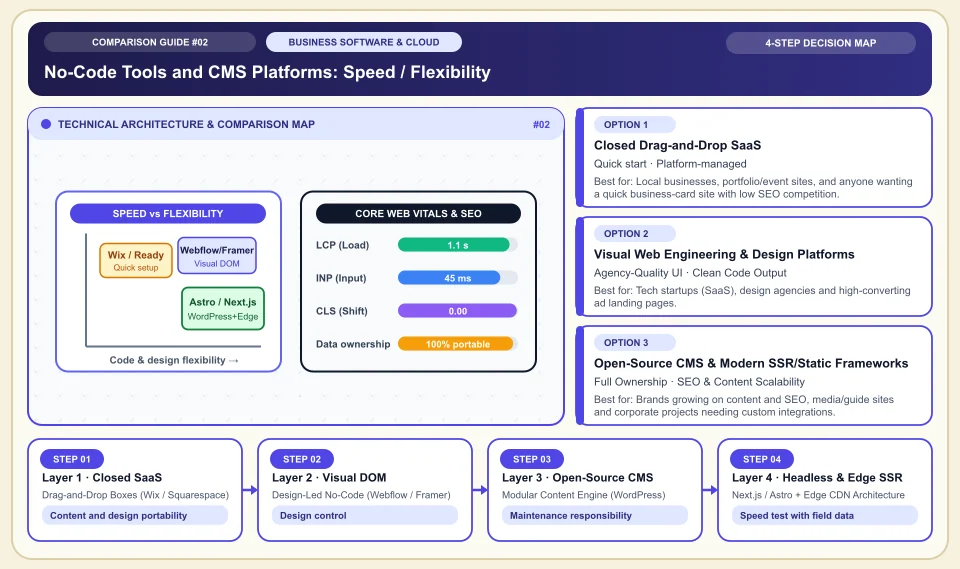
When choosing a site builder, weigh content portability, accessibility and real-user speed as much as design ease.
Ready-made platforms, open-source CMS and custom development bring different maintenance and migration costs. Whether a product is fast or slow cannot be said independently of the theme and content used. Check mobile Core Web Vitals with your own field data and content export terms on the plan you choose.
Track LCP, INP and CLS together in field data.
Try content, image and code export options before signing a contract.
Choose who is responsible for updates, security and maintenance according to your team's capacity.
No-Code Tools and CMS Platforms: Speed / Flexibility
The balance of performance and ownership when moving from closed SaaS builders to open-source CMS and modern edge SSR architectures:
Drag-and-Drop Boxes (Wix / Squarespace)
Setup and content export limits vary by the chosen plan and site features.
Design-Led No-Code (Webflow / Framer)
Designers work directly with real CSS Grid/Flexbox logic; animation and typography quality is at agency level.
Modular Content Engine (WordPress)
WordPress code and data can be managed; the number of plugins alone does not determine speed or security.
Next.js / Astro + Edge CDN Architecture
SSR and CDN architecture can deliver good field data; the Lighthouse score depends on configuration and page content.
An Honest Comparison of the Different Types, Pros and Cons
See the bottlenecks that marketing brochures hide, how each type works, and who each architecture suits, side by side:
1. Closed Drag-and-Drop SaaS (Wix, Squarespace, GoDaddy Builder)
Hosting, templates and a visual editor are bundled in one subscription; the user freely drags elements around a canvas.
✅ Strengths (pros)
- A business owner with no technical skills can connect a domain and go live the same day.
- Hosting, SSL and part of the updates are handled by the platform; check the scope in the plan.
⚠️ Weaknesses & limits (cons)
- The free-form drag-and-drop engine loads heavy JavaScript behind the scenes; room to intervene on mobile speed and technical SEO is limited.
- When you leave the platform you can usually take only the text; you cannot move the site to another server.
Local businesses, portfolio/event sites, and anyone wanting a quick business-card site with low SEO competition.
2. Visual Web Engineering & Design Platforms (Webflow, Framer)
The visual interface produces semantic HTML5, modern CSS and interactive components directly; CMS collections feed dynamic pages.
✅ Strengths (pros)
- Lets you ship custom-designed corporate sites with micro-animations (motion) that do not look like templates, without waiting for a developer.
- The generated HTML/CSS structure is much cleaner; Webflow allows static code export (Export) on higher plans.
⚠️ Weaknesses & limits (cons)
- The learning curve is steeper than standard drag-and-drop tools (you need to know the box model and responsive breakpoints).
- As localization, high CMS item limits and form traffic are added, the monthly subscription climbs quickly.
Tech startups (SaaS), design agencies and high-converting ad landing pages.
3. Open-Source CMS & Modern SSR/Static Frameworks (WordPress, Astro, Next.js)
Code and database can be managed by the business; the level of control varies with hosting and license terms.
✅ Strengths (pros)
- Flexible options for content, URL and schema management; plugin and theme portability matters.
- Instead of subscription items you pay hosting and maintenance costs; growth capacity depends on the infrastructure.
⚠️ Weaknesses & limits (cons)
- On WordPress, a wrong theme (heavy page builder) and uncontrolled plugin use slow the site down and create security gaps.
- Requires server caching (Cloudflare APO/CDN), backups and update discipline.
Brands growing on content and SEO, media/guide sites and corporate projects needing custom integrations.
Side-by-Side Technical Criteria and Performance Table
The core engineering, cost and usage parameters you can compare directly when deciding:
| Criterion | Closed Drag-and-Drop (Wix etc.) | Visual Design (Webflow / Framer) | Open-Source CMS (WordPress) | Engineering Decision |
|---|---|---|---|---|
| Mobile speed & Core Web Vitals | Medium / Low (heavy JS load) | High (clean DOM and CDN) | Depends on setup (very high with a light theme) | In ad and organic traffic, speed directly determines conversion rate. |
| Technical SEO & URL architecture control | Limited (mandatory prefixes possible) | High (custom schema and clean slugs) | Depends on code and infrastructure choice | Root URLs without categories and custom JSON-LD schema need an open architecture. |
| Data and design portability | None (only content can be copied) | Partial (Webflow gives static HTML) | Your own database and file access | If you are building a long-term digital asset, avoid locked-in systems. |
| Maintenance & security load | Platform manages; depends on plan terms | Platform manages; depends on plan terms | Medium (updates and WAF monitoring needed) | Decide on WAF and CDN needs according to your security and traffic model. |
| Scaling cost (1,000+ pages) | High / Not practical | High (CMS item limits apply) | Very low (server cost only) | For projects with many pages, try the content workflow and data migration. |
Providers and reference points
Providers, platforms or official information sources you can weigh against your own needs. The list is not a market-share ranking or a physical product test.
Webflow
- Real CSS mastery in a visual interface, clean HTML output and a strong CMS collection structure deliver agency quality without developers.
- CMS item, multi-language and seat fees vary by plan; compare current limits.
Framer
- Stands out for design-tool-like speed in building websites (as if using Figma), fluid animations and high mobile load performance.
- For deep content architecture, complex filtering and large blog/data directories, its CMS capabilities are narrower than Webflow and WordPress.
WordPress (Self-Hosted + Gutenberg / GeneratePress / Kadence)
- Offers wide flexibility in code, database and content management; the result depends on theme, plugins and maintenance.
- Becomes sluggish when loaded with heavy plugins such as Elementor/WPBakery; needs regular updates and firewall (WAF) management.
Wix Studio / Squarespace
- Combines booking, simple product sales, galleries and ready-made templates in one panel with no technical knowledge needed.
- The heavy client-side structure and the inability to move the design out when leaving the platform (migration) are the biggest drawbacks.
Category 1: Business Software, Cloud & B2B Infrastructure
Cloud server architecture, website builders, AI developer tools, CRM, business communication, project management and SEO decision matrices.
Sources and review method
We checked the Web Vitals thresholds against the primary source; platform speed and portability must be tested on the chosen plan, theme and site. Translated and adapted for an international audience on 2026-11-03.
Sources checked:
- Core Web Vitals thresholds ↗
Defines the field-data thresholds for LCP, INP and CLS; it does not verify any website builder's real score.
Frequently Asked Questions
Can I later move a site I built on a website builder platform to another server?
Exporting content is different from moving design and code. On the plan you choose, test which data, files and code you can actually take out.
For Google SEO rankings, is WordPress or Webflow/Wix the better choice?
Google looks not at the platform brand but at page load speed (Core Web Vitals), clean HTML semantics, URL structure and content depth. A WordPress site without heavy plugins or a well-configured Webflow/SSR site is crawled and ranked far better than drag-and-drop tools that load heavy JavaScript.
Which should I choose for a page that will receive Google Ads / Meta Ads traffic?
A slow load can affect conversion; no fixed bounce rate can be given. Decide using your own landing page field data and conversion tests.