
A practical comparison of Linear, Jira, Asana, Monday, ClickUp and Notion on speed, software sprint management, Gantt timelines and documentation.
Choose a project tool by trying it in your team's task, calendar and document flow.
Linear, Asana, Monday and Notion can suit different team habits. Linear documentation shows that cycle lengths are configurable; that is not proof of a speed advantage or of the right method for everyone. Measure the load of creating, updating and reporting tasks in a pilot.
Ask the software, marketing and operations teams to try the same sample project in each tool.
Evaluate task dependencies and the need for a document archive separately.
Measure interface speed on real devices with real team data.
Kanban, Scrum and Gantt Support Compared
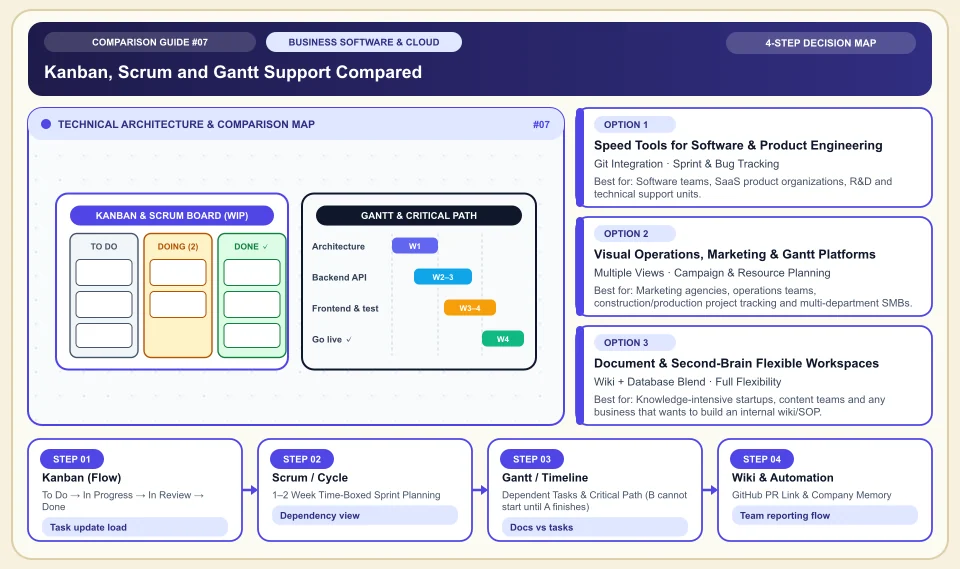
How the flow-focused Kanban board, the time-boxed Scrum/Cycle loop and the critical-path Gantt chart work:
To Do → In Progress → In Review → Done
In a constant stream of support, design and operations requests, it limits work in progress and exposes bottlenecks.
1–2 Week Time-Boxed Sprint Planning
The team focuses only on the chosen goals that week; random work cannot be pushed in mid-sprint.
Dependent Tasks & Critical Path (B cannot start until A finishes)
Dependency tracking can make visible how one delay affects other tasks.
GitHub PR Link & Company Memory
Status boards can reduce the need to ask the team for status; tasks must be kept current.
An Honest Comparison of the Different Types, Pros and Cons
See the bottlenecks that marketing brochures hide, how each type works, and who each architecture suits, side by side:
1. Speed Tools for Software & Product Engineering (Linear, Jira)
Built directly around GitHub/GitLab branches, pull request states, release notes and engineering cycles.
✅ Strengths (pros)
- Linear runs so fast with keyboard shortcuts and a local cache that developers can open and close tasks in seconds without touching the mouse.
- Jira can offer detailed permission and audit features; verify the plan and configuration scope.
⚠️ Weaknesses & limits (cons)
- Its terminology (issue, bug, PR, triage) is too technical and rigid for marketing, HR or field operations teams.
- Wrong configuration can increase task update load; measure in a pilot team.
Software teams, SaaS product organizations, R&D and technical support units.
2. Visual Operations, Marketing & Gantt Platforms (Asana, Monday.com, ClickUp)
Turns the same dataset with one click into List, Kanban Board, Calendar, Gantt Timeline and Team Workload views.
✅ Strengths (pros)
- Non-technical departments (marketing, sales, events, production) adapt right away with colorful tables and ready-made automation recipes.
- Shows managers how many hours of work each employee has and which project is late, on a top-level (portfolio) screen.
⚠️ Weaknesses & limits (cons)
- Tools like ClickUp that "fit everything on one screen" can bring menu clutter and a heavy interface.
- User license packages and in-between seat fees should be checked against the current quote.
Marketing agencies, operations teams, construction/production project tracking and multi-department SMBs.
3. Document & Second-Brain Flexible Workspaces (Notion, Coda)
Lets you design your own company operating system by building blocks and relational databases on a blank page.
✅ Strengths (pros)
- Meeting notes, the company handbook (SOP), the product roadmap and task lists live linked together in one place.
- Combines the cost of a separate documentation tool (Confluence) and a separate task tool into one subscription.
⚠️ Weaknesses & limits (cons)
- Without an information architecture, finding documents gets harder; the effect depends on how the team uses it.
- It is not as agile as dedicated tools (Linear) for task databases of thousands of rows and tight engineering sprints.
Knowledge-intensive startups, content teams and any business that wants to build an internal wiki/SOP.
Side-by-Side Technical Criteria and Performance Table
The core engineering, cost and usage parameters you can compare directly when deciding:
| Criterion | Linear | Jira (Atlassian) | Asana / Monday.com | Notion | Engineering Decision |
|---|---|---|---|---|---|
| Interface speed & keyboard fluency | Should be measured in real team use | Medium / Heavy | High (visual-focused) | Medium (slows on large tables) | In a developer team speed is everything; Linear lifts team motivation. |
| Gantt & dependency management | Roadmap-focused | Strong with Advanced Roadmaps | Strongest (drag-and-drop timeline) | Basic timeline | For agency and field projects with sequential deadlines, Asana/Monday wins. |
| Internal wiki & documentation | Project-summary level | Confluence needs an extra license | Basic Workdocs | Industry leader (blocks & wiki) | Try document and procedure management in a sample workflow. |
| GitHub / GitLab integration | Seamless (automatic PR/branch) | Very deep (commit/deploy trail) | Basic notification level | Preview-link level | For modern product development, the Linear + Notion pair is the gold standard. |
| Setup complexity | Setup time depends on team and settings | High (needs a Jira admin) | Easy (ready templates) | Medium (beware the blank-canvas trap) | In a small team, stay away from a tool that takes weeks to set up. |
Providers and reference points
Providers, platforms or official information sources you can weigh against your own needs. The list is not a market-share ranking or a physical product test.
Linear
- With its lightning-fast interface, keyboard-driven use, automatic triage/cycle logic and GitHub PR sync, it is the one tool engineers genuinely like to use.
- It does not offer flexible table/form templates for traditional non-software departments (accounting, procurement and so on).
Notion
- Combines documents and task tables on the same page; gathers internal rules, meeting notes and the content calendar in one hub.
- It has limits in very tight permissioning (row-level privacy) and heavy engineering tracking with thousands of tasks.
Asana & Monday.com
- Stands out with Gantt timelines, cross-department workflow automations and visual bottleneck/workload reports for managers.
- Advanced timeline, portfolio and automation features unlock on the higher price tiers.
Jira (Atlassian)
- Offers complex permission schemes, the JQL query language and enterprise audit compliance for engineering organizations of hundreds of people.
- Slow page loads and overly complex settings screens slow down small and mid-size teams.
Category 1: Business Software, Cloud & B2B Infrastructure
Cloud server architecture, website builders, AI developer tools, CRM, business communication, project management and SEO decision matrices.
Sources and review method
We checked a sample tool feature against the vendor documentation; speed and team fit should be tested on the same task workflow. Translated and adapted for an international audience on 2026-11-03.
Sources checked:
- Linear cycles ↗
Explains the cycle planning feature and its settings; it does not prove a speed advantage over other tools.
Frequently Asked Questions
How do we get the team to accept moving from tracking work in a WhatsApp group to a project management tool?
Pick one request channel the whole team shares. Try the rule of moving requests from WhatsApp or any other channel into the task system in a pilot.
We have both a software team and a marketing team; should we choose a single tool?
Not necessarily. The most successful tech companies share Notion for company-wide documents and the wiki, run engineering tasks in Linear (or Jira), and connect the two tools with a built-in integration.
What is the most common mistake on a Kanban board?
Too many columns and a high concurrent workload make tracking hard. Try column and task limits based on your team's flow.