
A comparison of how to choose an office chair and a height-adjustable desk: fit to your body, adjustability, materials and conditions of use.
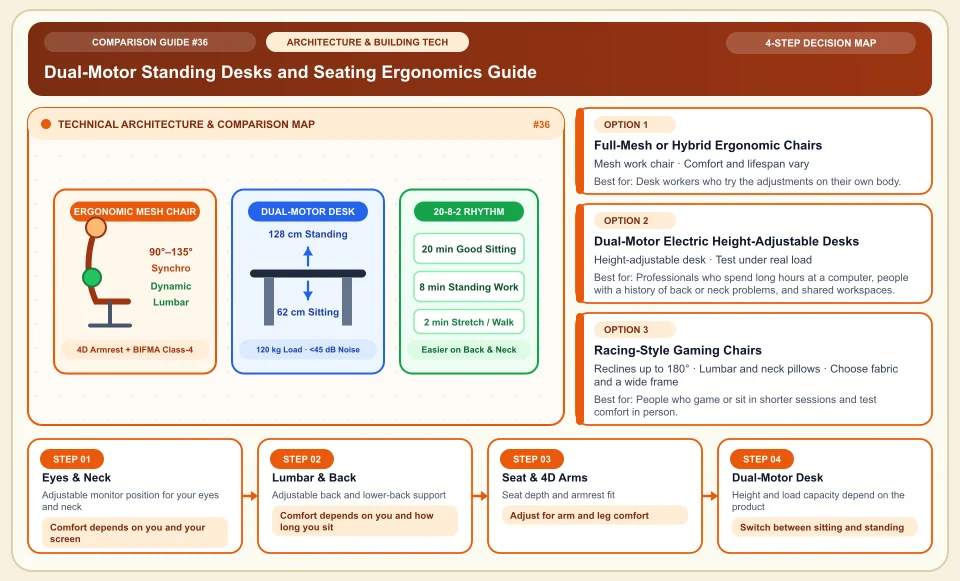
No single chair or desk prevents back pain or a herniated disc; an adjustable workspace and regular movement may help you stay comfortable.
When choosing a chair, test whether seat height, foot support, back support and armrest settings fit you. Focus on not staying in one position for long and on taking short breaks. There is no single seating angle or movement routine that works for everyone.
Try the back and seat adjustments on your own body; how a product looks is not a measure of ergonomics.
For a height-adjustable desk, check load capacity, wobble at your real working height and tabletop fit.
Set the monitor where you can see it comfortably without straining your neck; the right screen height varies from person to person.
Dual-Motor Standing Desks and Seating Ergonomics Guide
Monitor position, chair settings and ways to move between sitting and standing:
Adjustable monitor position for your eyes and neck
Set the monitor height so you can look at the screen comfortably; with a laptop, an external keyboard and a monitor riser can help on long days.
Adjustable back and lower-back support
Instead of locking into one ideal angle, adjust the supports and change position regularly.
Seat depth and armrest fit
Set seat depth, foot support and armrest height to your own body measurements.
Height and load capacity depend on the product
Height adjustment lets you switch between sitting and standing work; there is no guarantee of a specific medical effect or duration.
An Honest Comparison of the Different Types, Pros and Cons
See the bottlenecks that marketing brochures hide, how each type works, and who each architecture suits, side by side:
1. Full-Mesh or Hybrid Ergonomic Chairs (Mesh Back + Molded Foam Seat)
A tensioned elastomeric mesh or high-density molded polyurethane foam, a multi-point synchro mechanism and adjustable lumbar support spread body weight more evenly.
✅ Strengths (pros)
- Airflow and durability of mesh and fabric depend on the product and how it is used.
- Seat depth adjustment, 4D armrests and weight-sensitive synchro tilt let the chair fit users of different heights.
⚠️ Weaknesses & limits (cons)
- Try the mesh give and the side frame in person before you decide.
- If you sit cross-legged or with one foot tucked under you, the firm side frame of a full-mesh seat can be uncomfortable.
Desk workers who try the adjustments on their own body.
2. Dual-Motor Electric Height-Adjustable Desks (Standing Desks)
Each steel leg holds its own quiet DC motor and a 3-stage telescopic column; an anti-collision sensor and memory presets raise and lower the desk to your saved heights.
✅ Strengths (pros)
- Gives you the option of working standing up; it does not replace medical treatment for pain.
- Try the desk with your monitor and gear on it; load capacity depends on the product's technical documents.
⚠️ Weaknesses & limits (cons)
- Single-motor or cheap 2-stage desks may not go low enough for shorter users and can make the screen shake when typing at full height.
- Cables need an under-desk tray and a spine cable channel so they do not pull or snap when the desk moves.
Professionals who spend long hours at a computer, people with a history of back or neck problems, and shared workspaces.
3. Racing-Style Gaming Chairs (Fabric vs PU Faux Leather)
A steel-tube frame is covered with molded foam, side bolsters and removable elastic lumbar and neck pillows.
✅ Strengths (pros)
- The back can recline 160–180°, so it can double as a rest chair during a gaming break or a movie.
- Newer breathable woven fabric and built-in mechanical lumbar models (for example Razer Iskur V2 and Secretlab) reduce some of the problems of older faux-leather chairs.
⚠️ Weaknesses & limits (cons)
- Durability of the cover depends on the material, care and use.
- A simple strapped-on lumbar pillow slips every time you sit down and does not support the lower back as accurately as a true office chair.
People who game or sit in shorter sessions and test comfort in person.
Side-by-Side Technical Criteria and Performance Table
The core engineering, cost and usage parameters you can compare directly when deciding:
| Criterion | Premium Full-Mesh (Herman Miller / Steelcase) | Value Hybrid Office Chair (Mesh Back + Foam) | Fabric Gaming Chair | PU Faux-Leather Gaming Chair | Bottom Line |
|---|---|---|---|---|---|
| Long-session comfort | Depends on the person and settings | Depends on the person and settings | Depends on the person and settings | Depends on the person and settings | No chair guarantees a health outcome. |
| Airflow | Depends on mesh and fabric design | Depends on mesh and fabric design | Depends on fabric design | Depends on the cover and the room | Try the material in real use. |
| Mechanism | Verify on the specific model | Verify on the specific model | Verify on the specific model | Verify on the specific model | Try the back and seat adjustments on your own body. |
| Durability | Depends on warranty and care | Depends on warranty and care | Depends on warranty and care | Depends on warranty and care | Read the written warranty instead of trusting a fixed lifespan. |
| Sitting habits | Depends on the side frame | Depends on seat size | Depends on bolsters and seat size | Depends on seat size | Change position often and test the settings. |
Providers and reference points
Providers, platforms or official information sources you can weigh against your own needs. The list is not a market-share ranking or a physical product test.
Herman Miller (Aeron, Embody, Mirra 2), Steelcase (Leap V2, Gesture) & Haworth (Fern)
- The Aeron and Embody have adjustment and support features; comfort and lifespan depend on the user, the model and upkeep.
- If you buy second-hand, check the item's condition and any remaining warranty separately.
IKEA (Markus, Järvfjället)
- Check warranty, materials and adjustment range model by model, for IKEA and every other brand.
- The IKEA Markus has fixed armrests, so it may not slide fully under the desk; entry-level chairs can also need their mechanism lubricated with silicone spray about once a year.
Standing Desk Makers (Linak-motor desks, Kinnarp, FlexiSpot, IKEA Mittzon / Idåsen)
- Check the motor and leg system's load capacity, stability and warranty in the documents for the specific desk model.
- When choosing a desk, test wobble under real load, load capacity and height range before you count motors.
Category 4: Architecture, Building & Living Spaces
In-room soundproofing, R290 heat pumps, reverse-osmosis water purifiers, hydroponic farming, ergonomics, solar low-E facades and smart irrigation.
Sources and review method
Based on the CDC/NIOSH office guidance on personal fit, short breaks and varied movement. This source does not test whether any chair or desk prevents a medical condition.
Sources checked:
- CDC/NIOSH — Office Environments and Your Safety ↗
Short breaks, posture variety and a workspace that fits the person.
Frequently Asked Questions
What is the difference between a simple "butterfly" mechanism and a multitilt / synchro mechanism?
Try chair mechanisms in a store for back and seat movement, locking and how well they fit you; no single ratio applies to every model.
I'm over 6 ft 1 in (1.85 m) and over 220 lb (100 kg); which specs should I look at?
Check load capacity, base design and seat depth in the product's technical documents and against your own measurements.
What thickness and material of tabletop should I put on an electric desk?
For a monitor arm clamp, check the tabletop's load and clamping conditions as stated by the manufacturer; material thickness alone does not guarantee that it is sufficient.